Vendor Integration
Government reference implementations of decision models are open-source and validated by the responsible authority. Commercial vendors build their own implementations on top of these reference models, offering enterprise support, SLAs, and additional capabilities. The Vendor tab lets service owners document these vendor implementations and their certification status as part of the service's Linked Data record.
Multi-vendor architecture
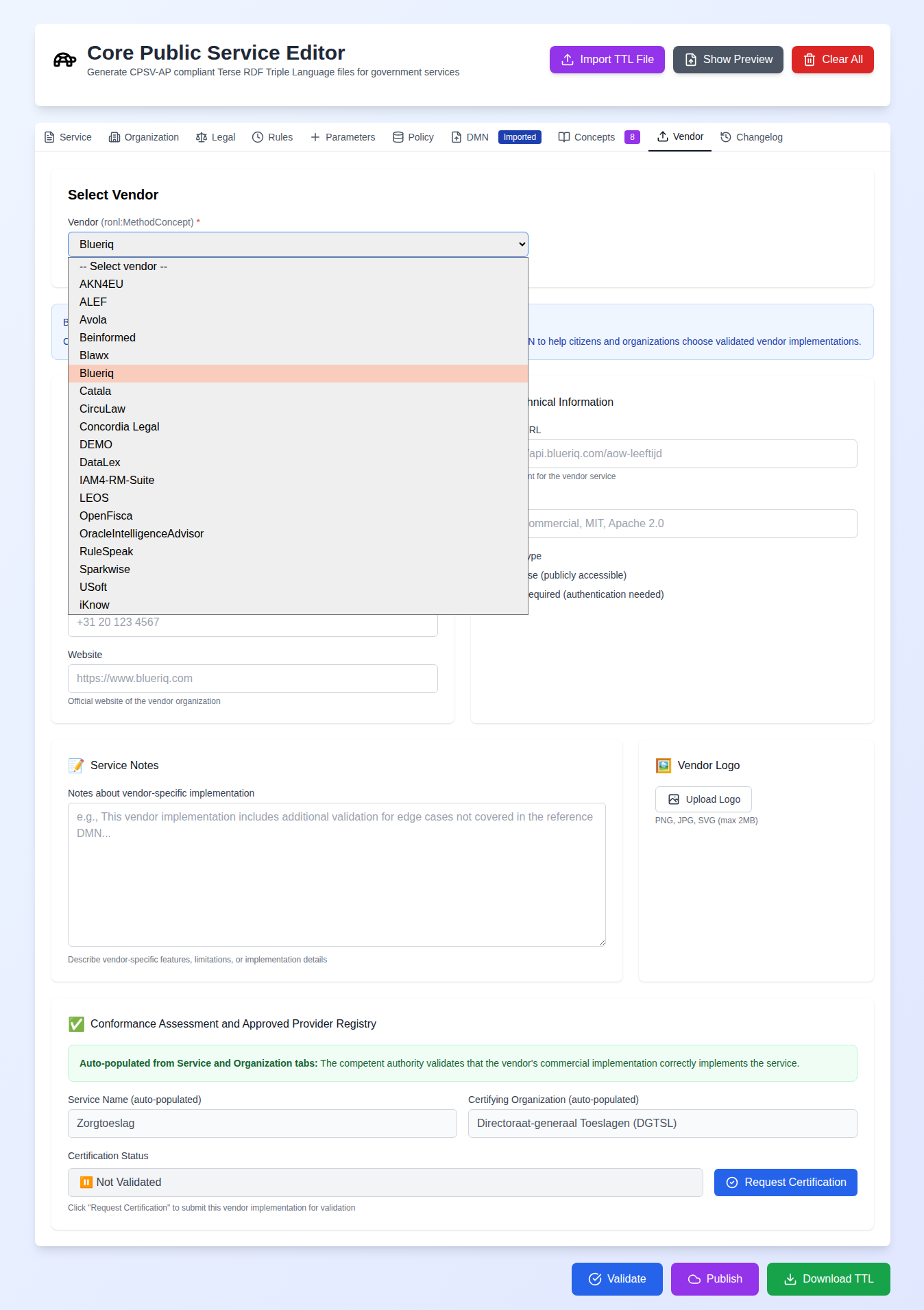
The vendor list is loaded dynamically from the RONL vocabulary in TriplyDB, querying for all ronl:MethodConcept instances. This means new vendors appear in the dropdown automatically when they are added to the vocabulary — no editor update is required. Currently 17 vendor platforms are listed, with full integration implemented for iKnow and the Blueriq metadata form serving as the reference implementation for the broader pattern.
Each vendor implementation is modelled as a ronl:VendorService, linked to the reference service via ronl:basedOn and to the implementing organisation via schema:provider. The TTL output uses Schema.org and RONL vocabularies for contact, technical, and certification metadata.
iKnow integration
iKnow is a legislative analysis and knowledge management platform. The iKnow integration allows field mappings from iKnow XML exports to CPSV-AP properties to be configured and saved, then used to import actual iKnow data files.
The integration works in two modes. In Configure mode, an example XML file is uploaded and each XML field is mapped to the corresponding CPSV-AP property for each editor section (Service, Legal, Rules, Parameters, CPRMV). The configuration is saved as a reusable JSON file. In Import mode, the actual iKnow data file is uploaded, the saved configuration is selected, and the mapped data is previewed before importing into the editor.
A mapping configuration is data the editor executes — its field paths are walked and its replace-transform patterns are compiled — so two kinds of configuration are neutralised:
- Field paths containing
__proto__,constructororprototypeare not walked at all: reading one yields nothing, and writing one does nothing. A path is walked segment by segment, creating missing objects on the way, so without the check a target field such as__proto__.pollutedwould write to every object in the application. - Transform patterns that can run away. A quantified group that itself contains a quantifier —
(\d+)+— is refused, because on a non-matching value it can take effectively forever on the browser's main thread; a literal such as(\+)+is allowed. Patterns over 200 characters are refused too, as a backstop, because that first check is deliberately narrow and will not catch every such construction.
A refused pattern raises an error rather than skipping the transform, so a bad configuration is visible instead of producing quietly wrong import data. Today every configuration applied comes from the bundled iknow-mappings/; the checks exist because nothing in these functions depends on that staying true.
Certification workflow
The Vendor tab includes a certification tracking workflow. A vendor implementation can be marked with one of several certification statuses. When the status is set to certified, the certifying organisation (typically the competent authority from the Organisation tab) and certification date are required. A certification modal guides users through this process.
The certification details are included in the Turtle output as ronl:certificationStatus, ronl:certifiedBy, ronl:certifiedAt, and ronl:certificationNote properties, making certification status queryable via SPARQL.
Adding new vendors
The architecture is designed for extension. Each vendor integration is a separate component in src/components/tabs/vendors/, rendered conditionally based on the selected vendor URI. Adding a new vendor integration requires creating the vendor-specific form component, implementing its data parser, creating a field mapping configuration, and adding state management — without modifying any existing vendor components.