Skip to content

DSO Viewer APIs โ€” Slide Deck

A thirteen-slide technical review of how the LDE DSO Viewer talks to the Digitaal Stelsel Omgevingswet: the proxy layer, the six upstream APIs, what each tab calls, how an activity's dossier is assembled, and the loose ends that are still open. The slides summarise what the surrounding pages document in prose โ€” DSO Integration for the architecture, the API Specification for per-endpoint detail.

Download

DSO Viewer APIs Deck (PDF, 184 KB)

The deck is designed from docs/dso-viewer-apis.md in the linked-data-explorer repository and exported as slides; this copy reflects the deck as of 24 September 2026, against LDE v2026.09.6. It is a dated review, not a live view โ€” where the product has moved since, these pages are the current account.


Architecture

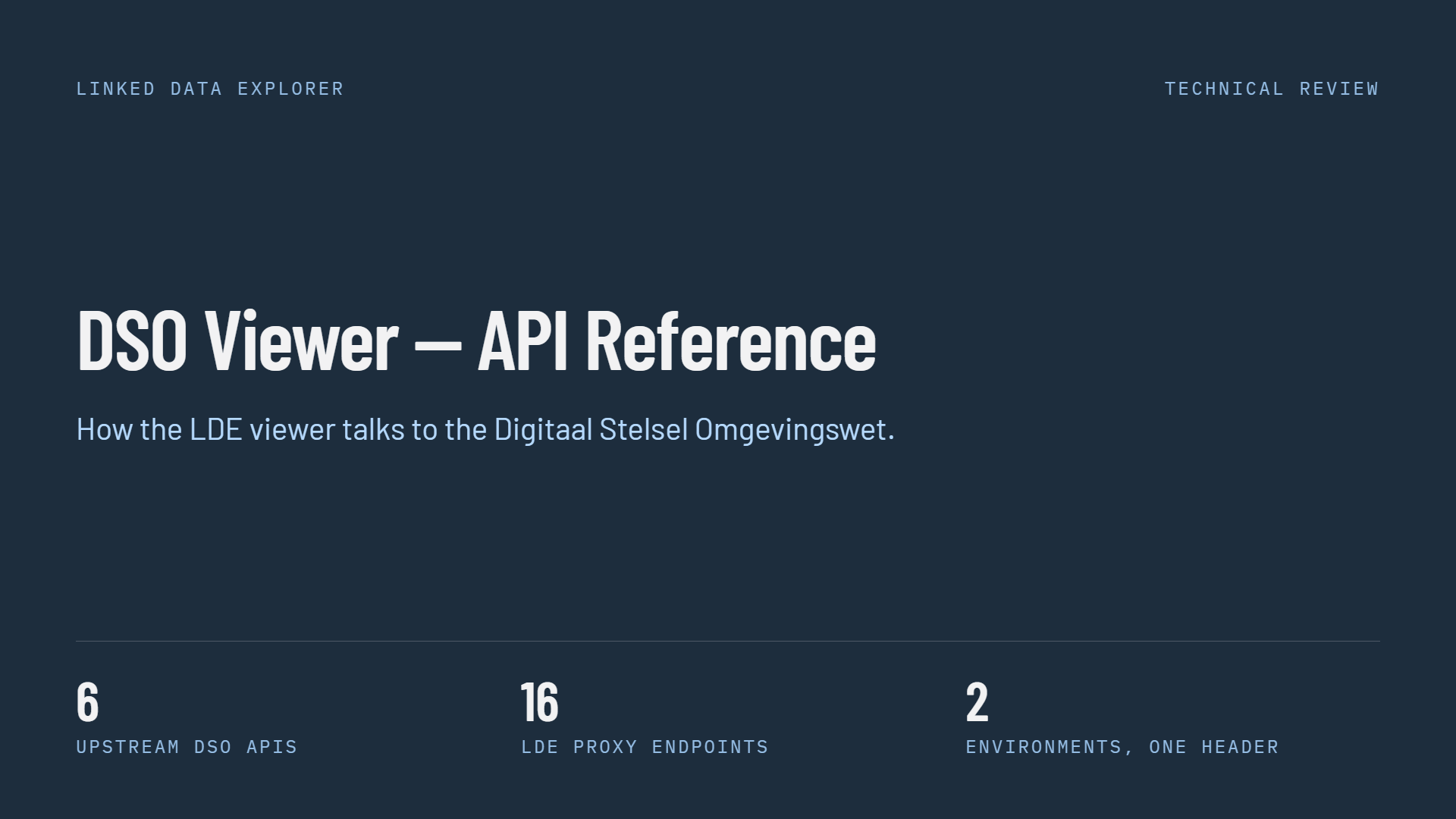
Slide 1 of 13, title slide on a dark navy background: heading DSO Viewer โ€” API Reference, subtitle How the LDE viewer talks to the Digitaal Stelsel Omgevingswet, labelled Linked Data Explorer and Technical Review, with three figures along the bottom โ€” 6 upstream DSO APIs, 16 LDE proxy endpoints, 2 environments one header

Six upstream APIs, sixteen proxy endpoints, two environments

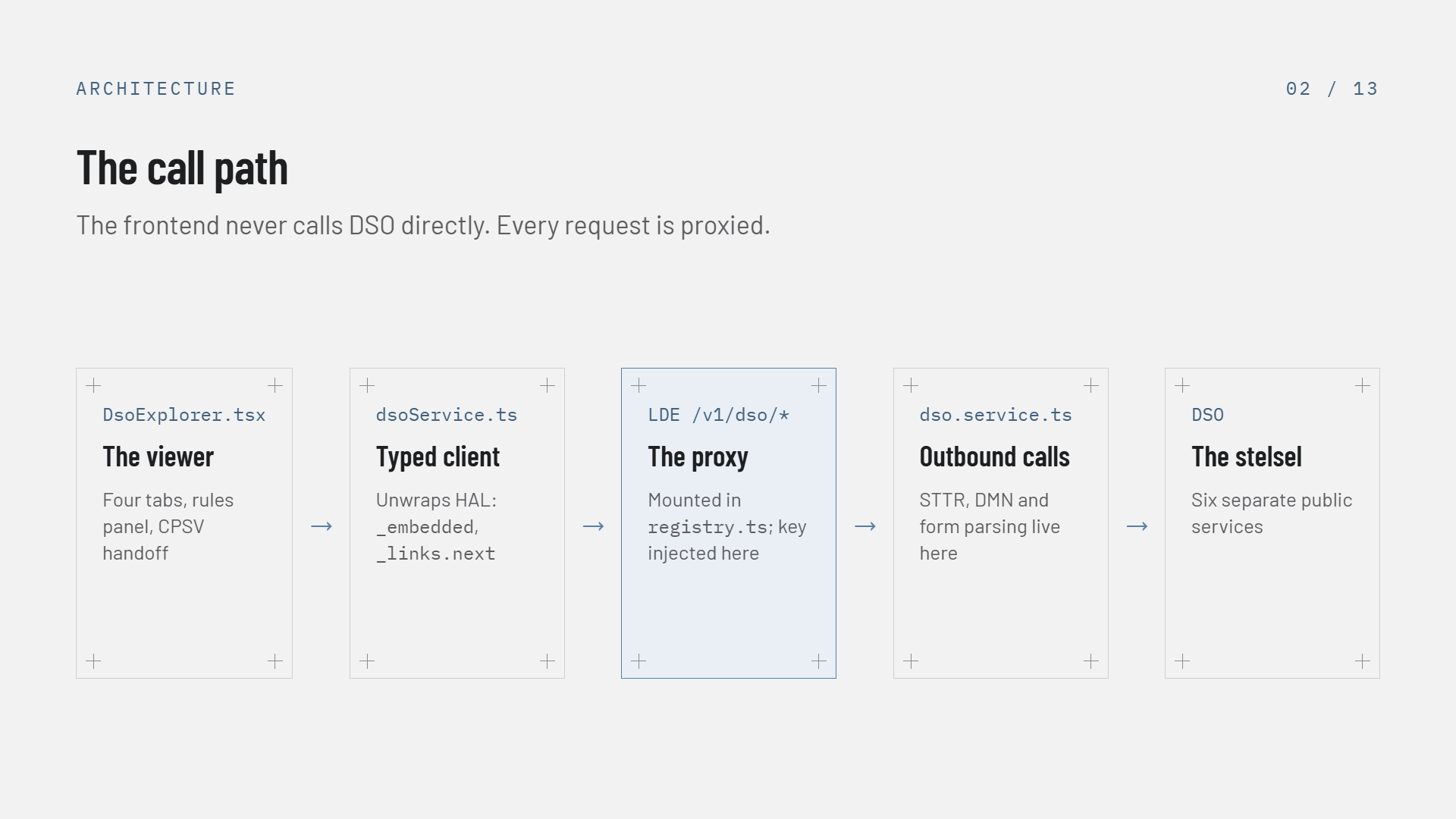
Slide 2 of 13, The call path: five boxes left to right with arrows between them โ€” DsoExplorer.tsx the viewer with four tabs, rules panel and CPSV handoff; dsoService.ts the typed client that unwraps HAL _embedded and _links.next; LDE /v1/dso/* the proxy mounted in registry.ts where the key is injected, highlighted in blue; dso.service.ts where outbound STTR, DMN and form parsing live; and DSO, six separate public services. Subtitle: the frontend never calls DSO directly, every request is proxied

The frontend never calls DSO directly โ€” every request is proxied

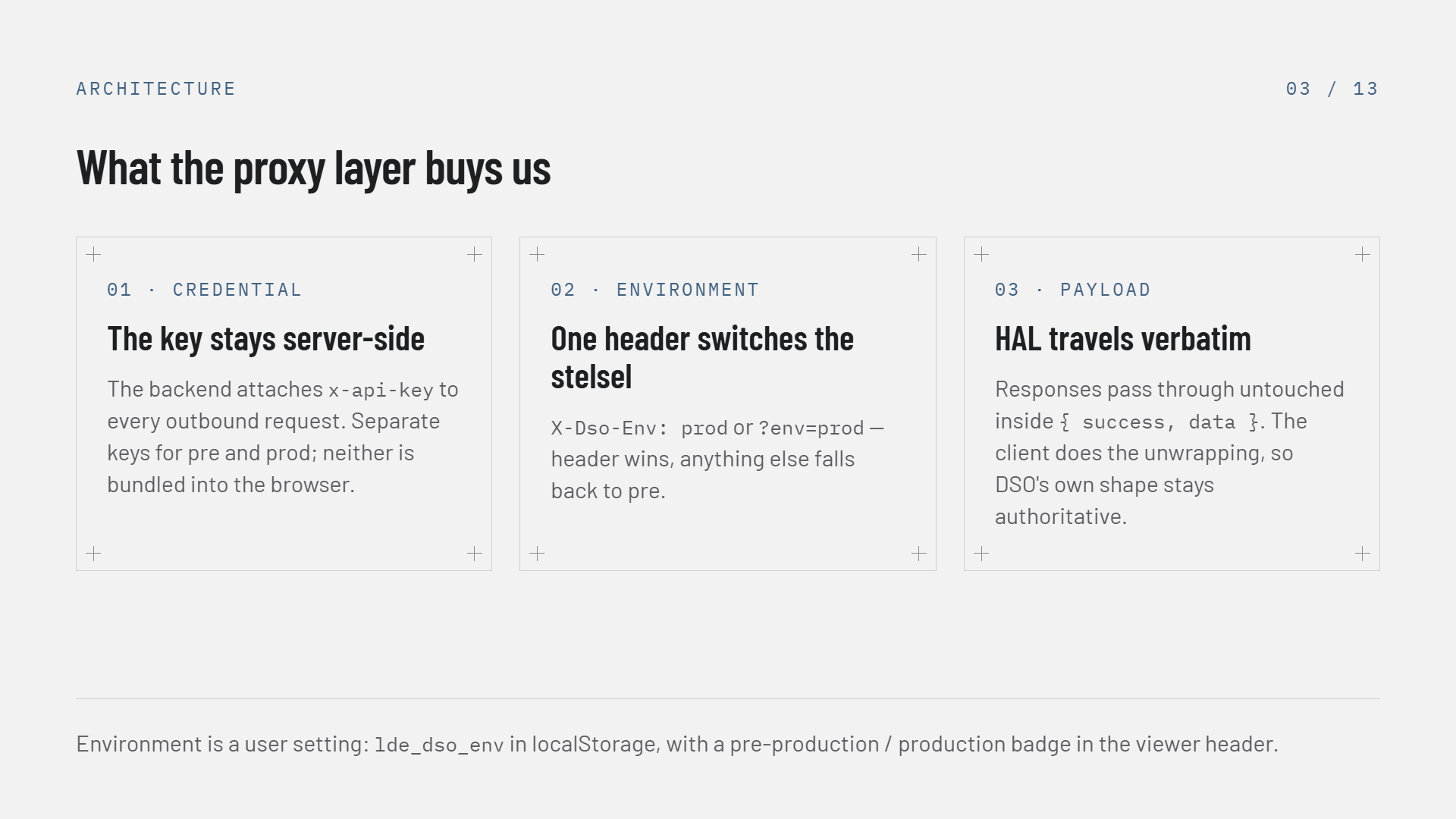
Slide 3 of 13, What the proxy layer buys us: three cards โ€” 01 Credential, the key stays server-side, the backend attaches x-api-key to every outbound request with separate keys for pre and prod, neither bundled into the browser; 02 Environment, one header switches the stelsel, X-Dso-Env prod or ?env=prod, header wins and anything else falls back to pre; 03 Payload, HAL travels verbatim inside success-data so DSO's own shape stays authoritative. Footer: environment is a user setting, lde_dso_env in localStorage, with a badge in the viewer header

Credential, environment and payload โ€” the three reasons the proxy exists

The six upstream APIs

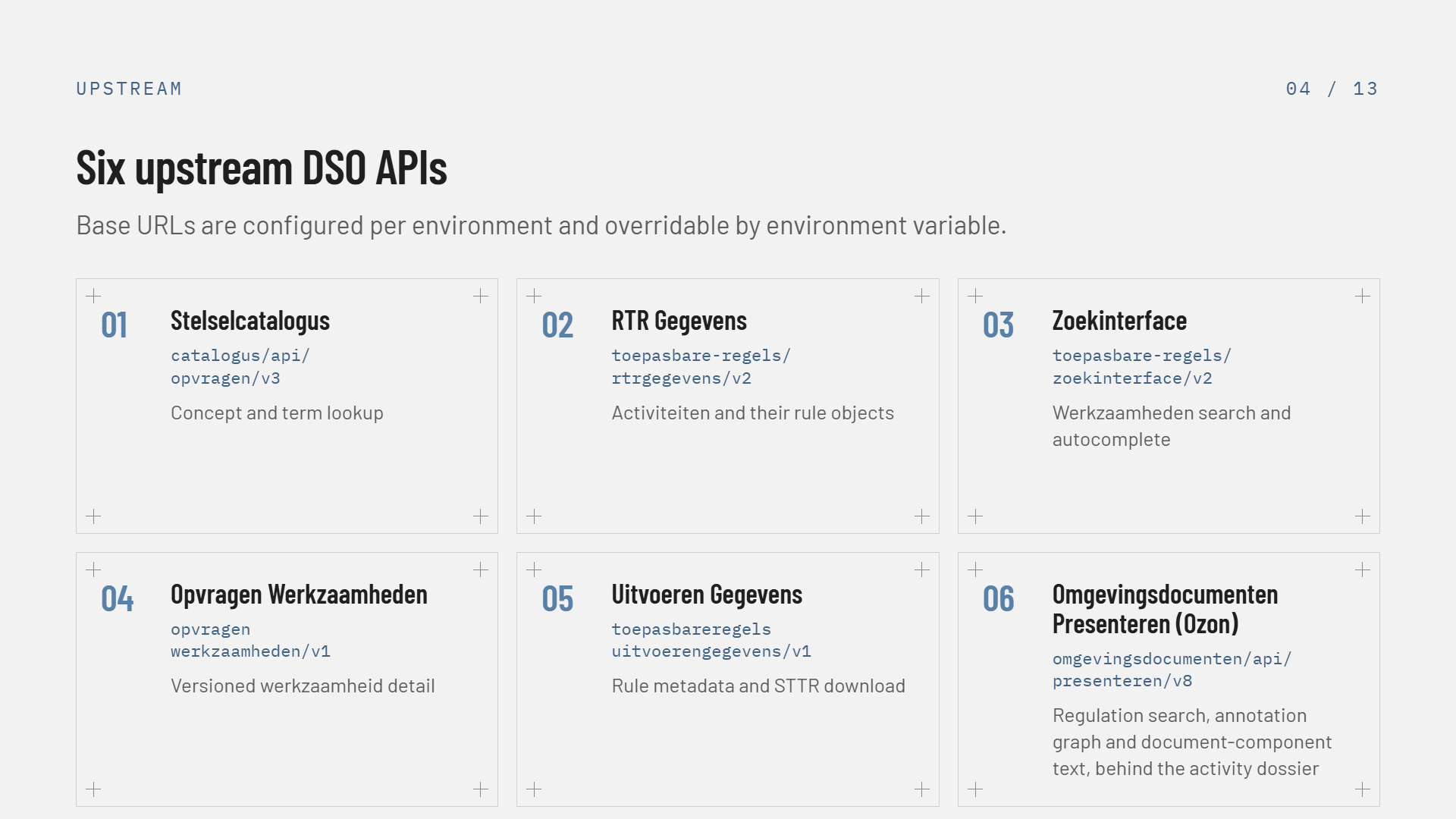
Slide 4 of 13, Six upstream DSO APIs as six numbered cards in a three-by-two grid, each with its path โ€” 01 Stelselcatalogus, catalogus/api/opvragen/v3, concept and term lookup; 02 RTR Gegevens, toepasbare-regels/rtrgegevens/v2, activiteiten and their rule objects; 03 Zoekinterface, toepasbare-regels/zoekinterface/v2, werkzaamheden search and autocomplete; 04 Opvragen Werkzaamheden, opvragen werkzaamheden/v1, versioned werkzaamheid detail; 05 Uitvoeren Gegevens, toepasbareregels uitvoerengegevens/v1, rule metadata and STTR download; 06 Omgevingsdocumenten Presenteren (Ozon), omgevingsdocumenten/api/presenteren/v8, regulation search, annotation graph and document-component text, behind the activity dossier. Subtitle: base URLs are configured per environment and overridable by environment variable

The six APIs behind one /v1/dso surface โ€” Ozon is the newest

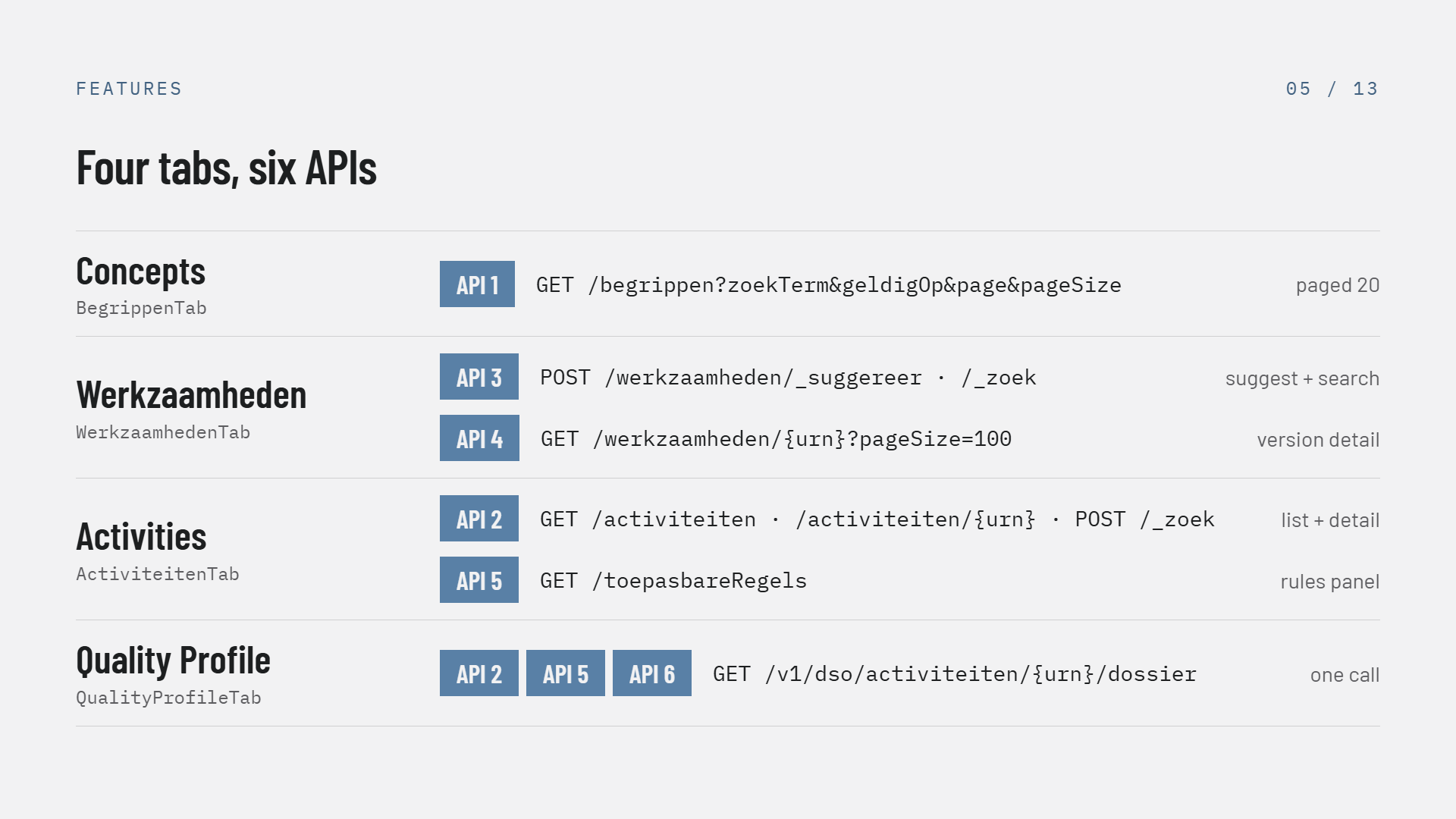
Slide 5 of 13, Four tabs six APIs: a table mapping each viewer tab to its calls โ€” Concepts (BegrippenTab) uses API 1, GET /begrippen with zoekTerm, geldigOp, page and pageSize, paged 20; Werkzaamheden (WerkzaamhedenTab) uses API 3, POST /werkzaamheden/_suggereer and /_zoek for suggest and search, plus API 4, GET /werkzaamheden/{urn}?pageSize=100 for version detail; Activities (ActiviteitenTab) uses API 2, GET /activiteiten, /activiteiten/{urn} and POST /_zoek for list and detail, plus API 5, GET /toepasbareRegels for the rules panel; Quality Profile (QualityProfileTab) uses APIs 2, 5 and 6 in one call, GET /v1/dso/activiteiten/{urn}/dossier

Which tab calls which API โ€” the fourth reaches three of them in a single call

The dossier and the quality profile

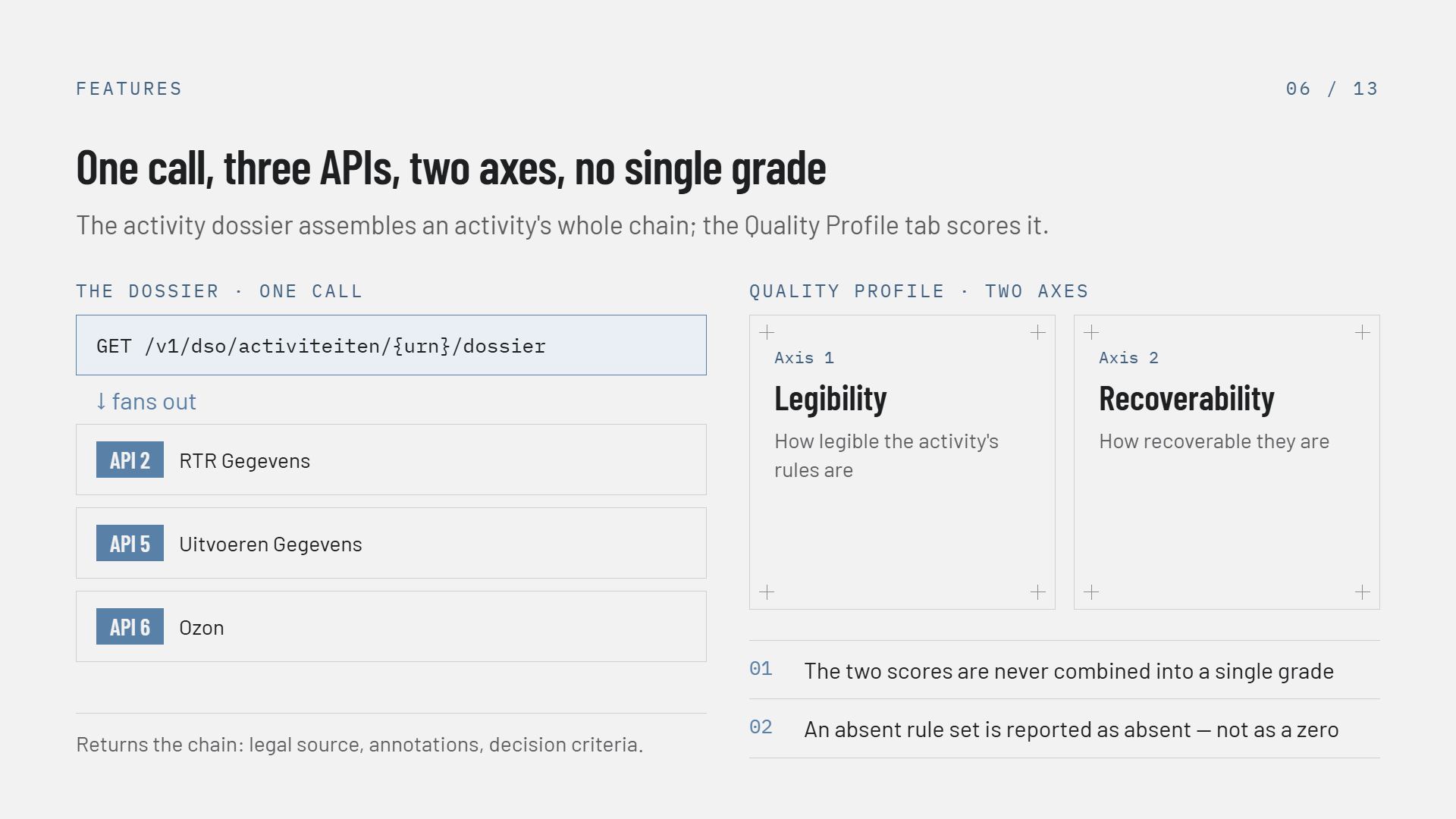
Slide 6 of 13, One call three APIs two axes no single grade. On the left, THE DOSSIER ยท ONE CALL: GET /v1/dso/activiteiten/{urn}/dossier fans out to API 2 RTR Gegevens, API 5 Uitvoeren Gegevens and API 6 Ozon, and returns the chain โ€” legal source, annotations, decision criteria. On the right, QUALITY PROFILE ยท TWO AXES: Axis 1 Legibility, how legible the activity's rules are, and Axis 2 Recoverability, how recoverable they are, with two numbered notes โ€” 01 the two scores are never combined into a single grade, 02 an absent rule set is reported as absent, not as a zero. Subtitle: the activity dossier assembles an activity's whole chain; the Quality Profile tab scores it

One call joins three APIs; the profile scores it on two axes and stops there

Activities and the fan-out

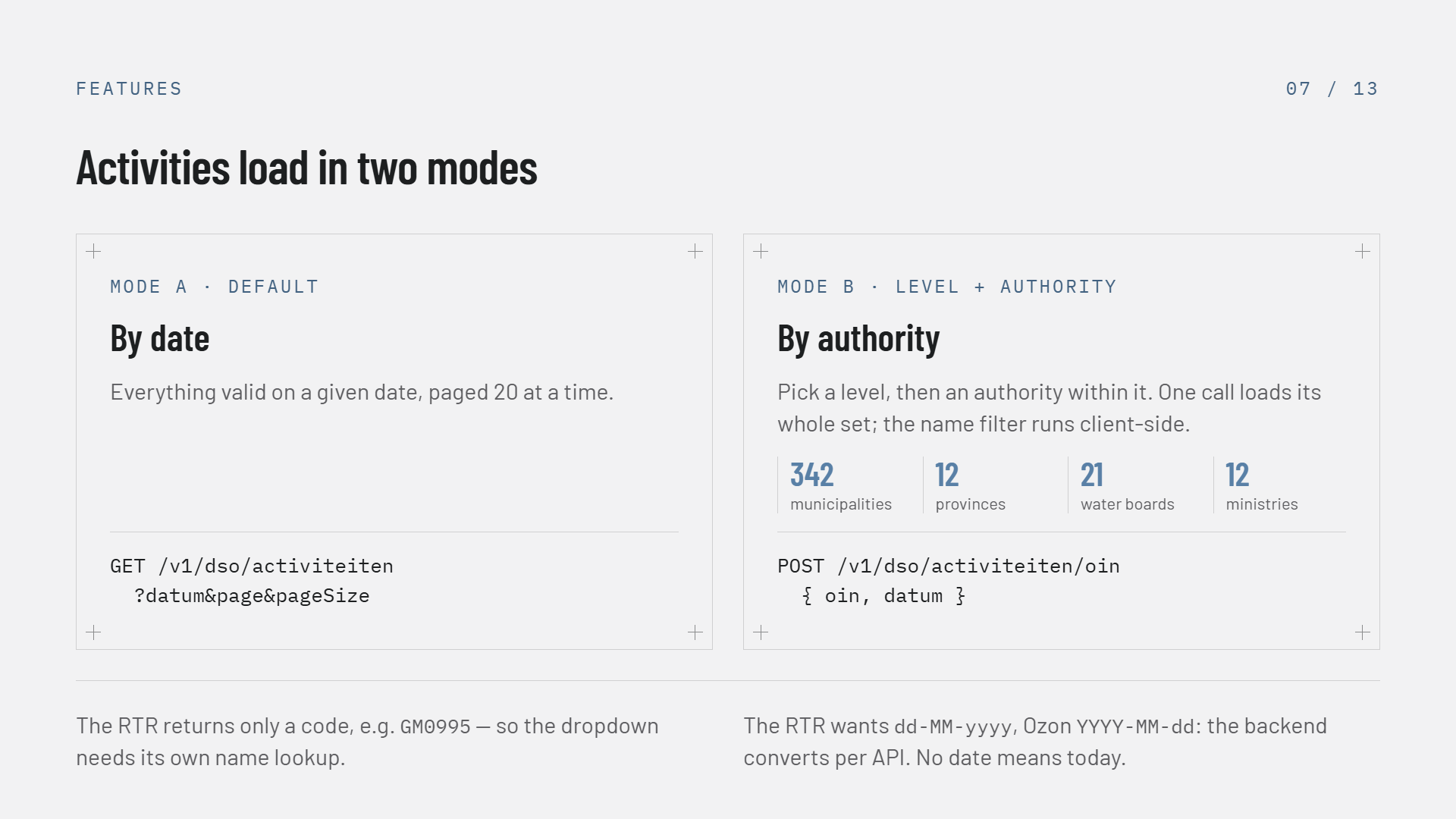
Slide 7 of 13, Activities load in two modes. Mode A, default, By date: everything valid on a given date, paged 20 at a time, GET /v1/dso/activiteiten?datum&page&pageSize. Mode B, Level + authority, By authority: pick a level then an authority within it, one call loads its whole set so the name filter runs client-side, POST /v1/dso/activiteiten/oin with oin and datum, with the counts 342 municipalities, 12 provinces, 21 water boards and 12 ministries. Two footnotes: the RTR returns only a code such as GM0995, so the dropdown needs its own name lookup; and the RTR wants dd-MM-yyyy while Ozon wants YYYY-MM-dd, so the backend converts per API, with no date meaning today

Two load modes: by date, or an authority's complete set in one call

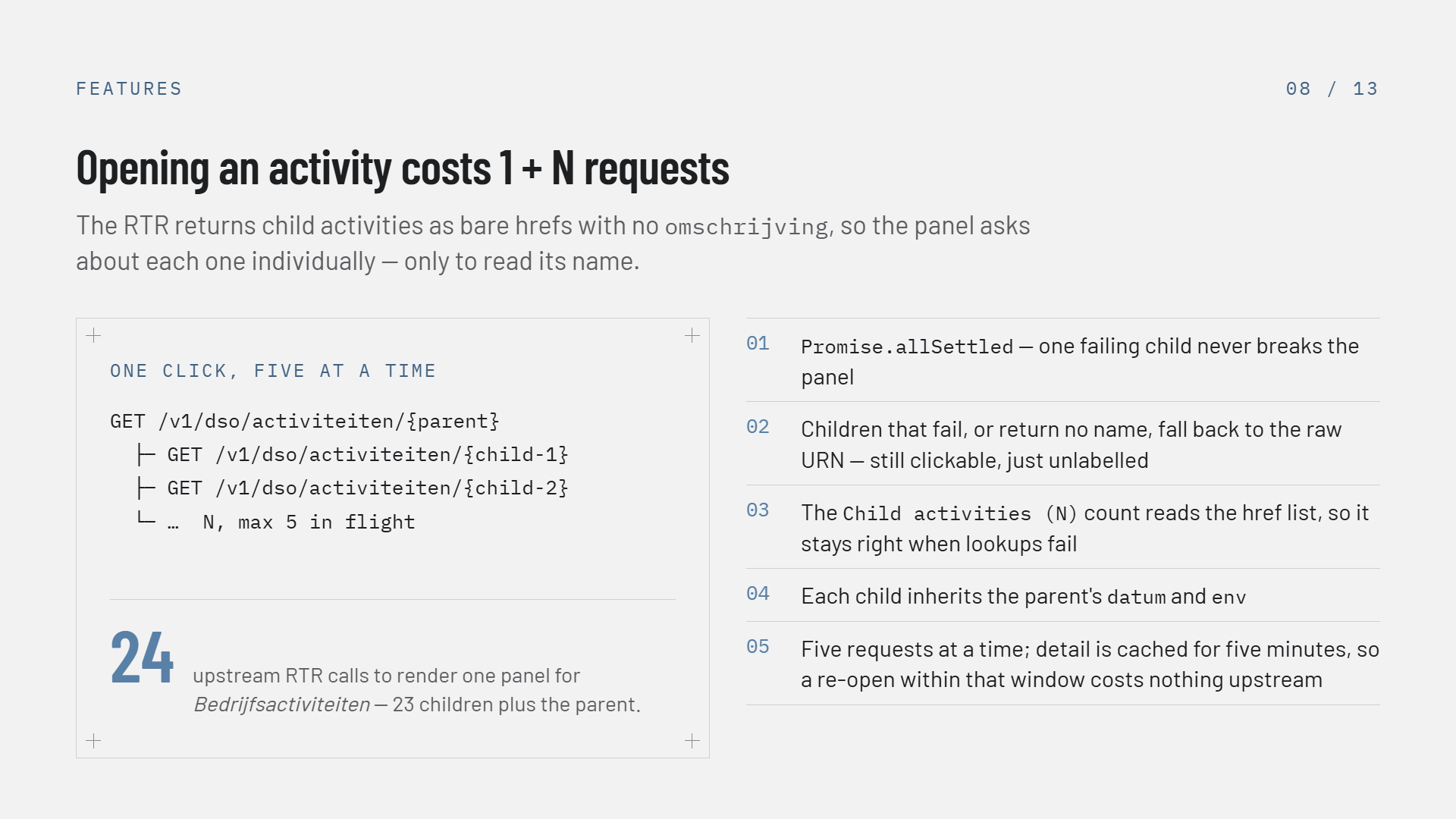
Slide 8 of 13, Opening an activity costs 1 + N requests: the RTR returns child activities as bare hrefs with no omschrijving, so the panel asks about each one individually only to read its name. A code block headed ONE CLICK, FIVE AT A TIME shows GET /v1/dso/activiteiten/{parent} with two indented child requests and a line reading N, max 5 in flight, beside the figure 24 โ€” upstream RTR calls to render one panel for Bedrijfsactiviteiten, 23 children plus the parent. Five numbered notes: Promise.allSettled means one failing child never breaks the panel; children that fail or return no name fall back to the raw URN, still clickable; the Child activities (N) count reads the href list so it stays right when lookups fail; each child inherits the parent's datum and env; five requests go out at a time and detail is cached for five minutes, so a re-open within that window costs nothing upstream

The viewer's heaviest interaction โ€” 1 + N calls, five at a time

Applicable rules

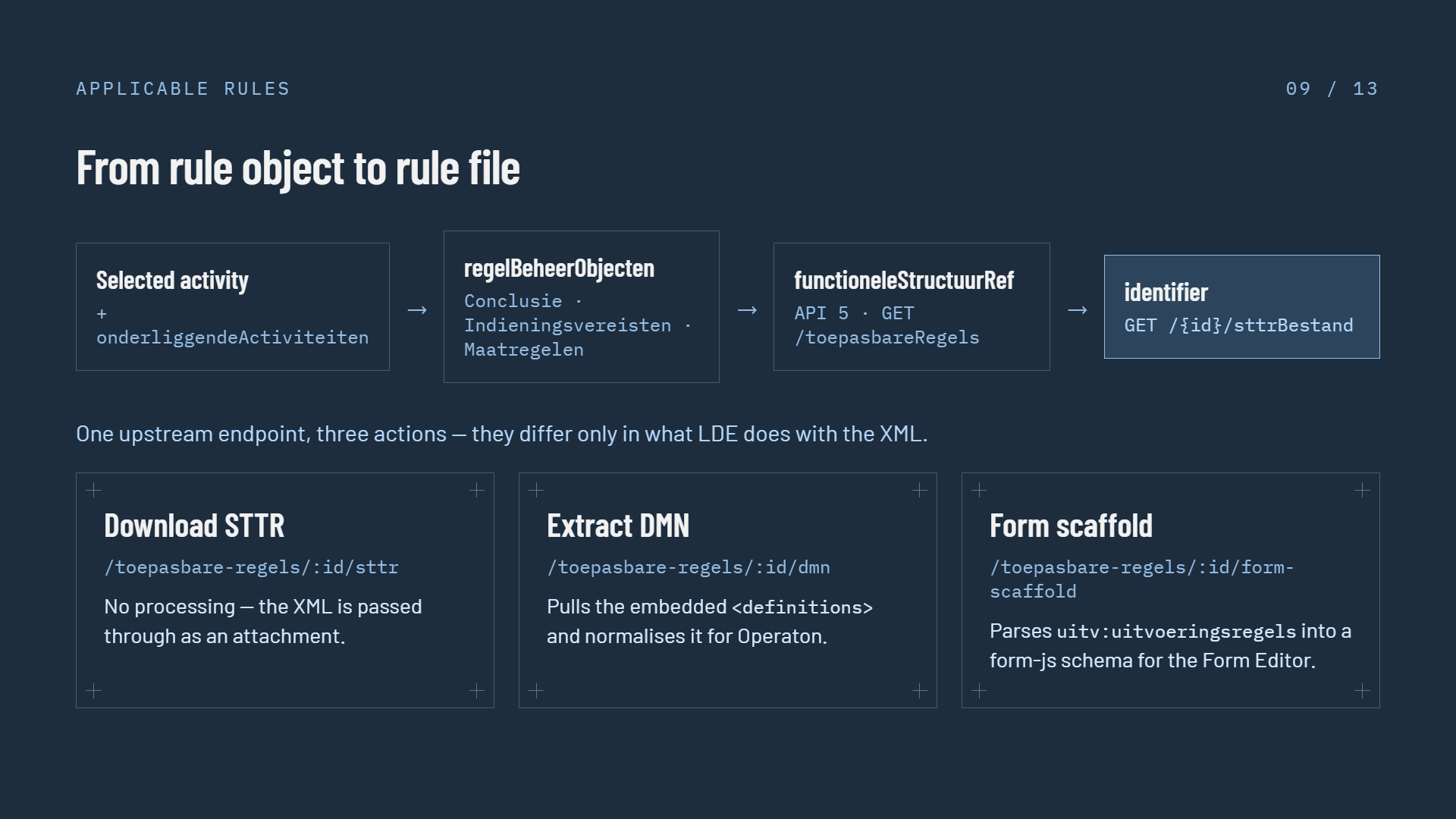
Slide 9 of 13, From rule object to rule file, on a dark navy background: a four-step chain โ€” selected activity plus onderliggendeActiviteiten, then regelBeheerObjecten typed Conclusie, Indieningsvereisten or Maatregelen, then functioneleStructuurRef resolved with API 5 GET /toepasbareRegels, then identifier with GET /{id}/sttrBestand. Below, one upstream endpoint three actions that differ only in what LDE does with the XML โ€” Download STTR at /toepasbare-regels/:id/sttr passes the XML through as an attachment; Extract DMN at /:id/dmn pulls the embedded definitions and normalises it for Operaton; Form scaffold at /:id/form-scaffold parses uitv:uitvoeringsregels into a form-js schema for the Form Editor

One upstream STTR download, three different things LDE does with it

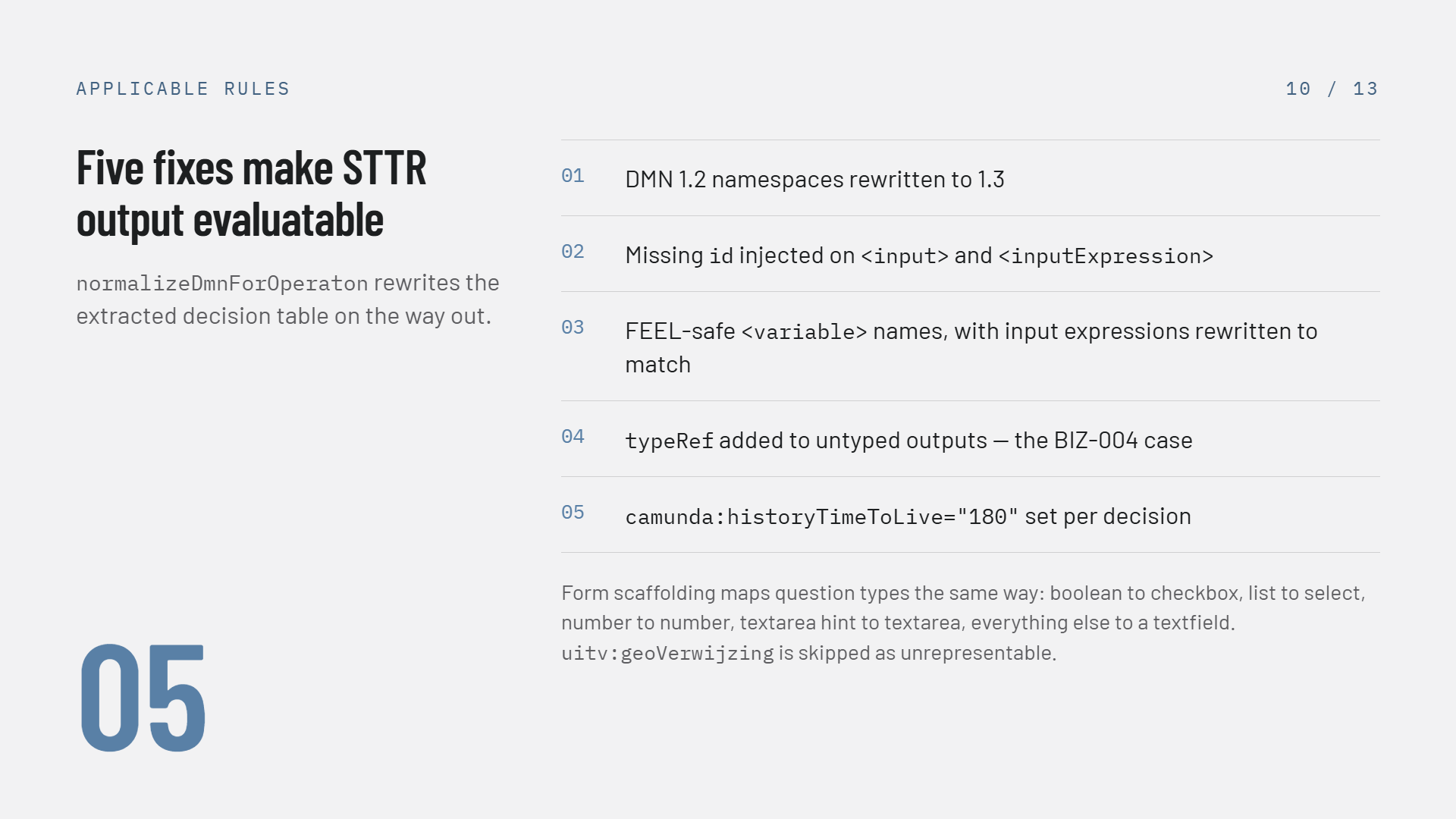
Slide 10 of 13, Five fixes make STTR output evaluatable โ€” normalizeDmnForOperaton rewrites the extracted decision table on the way out: 01 DMN 1.2 namespaces rewritten to 1.3; 02 missing id injected on input and inputExpression; 03 FEEL-safe variable names with input expressions rewritten to match; 04 typeRef added to untyped outputs, the BIZ-004 case; 05 camunda:historyTimeToLive set to 180 per decision. Footer: form scaffolding maps question types the same way โ€” boolean to checkbox, list to select, number to number, textarea hint to textarea, everything else to a textfield, and uitv:geoVerwijzing is skipped as unrepresentable

What normalizeDmnForOperaton changes on the way out
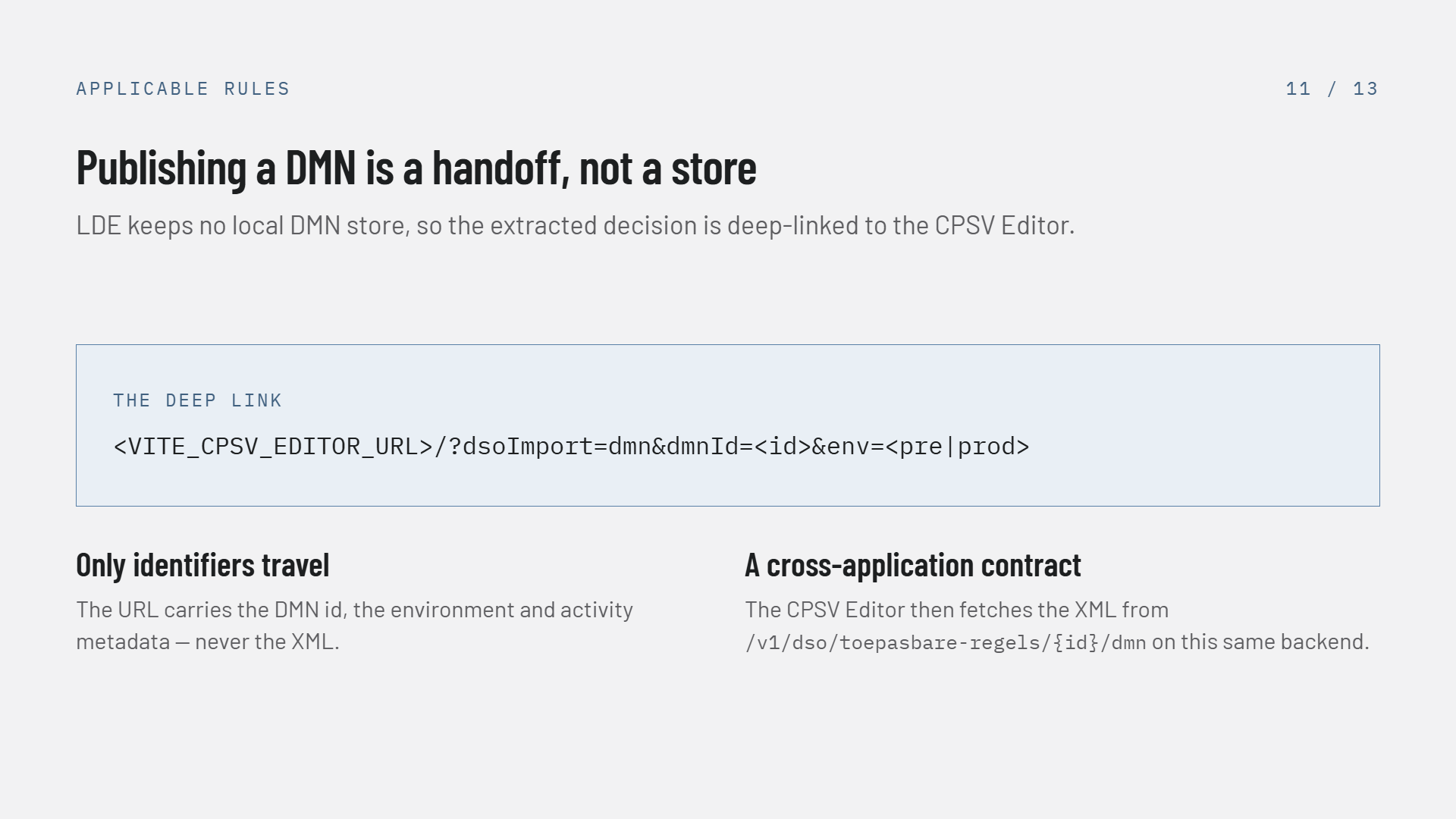
Slide 11 of 13, Publishing a DMN is a handoff not a store: LDE keeps no local DMN store, so the extracted decision is deep-linked to the CPSV Editor. The deep link is shown as VITE_CPSV_EDITOR_URL/?dsoImport=dmn&dmnId=<id>&env=<pre|prod>. Two notes: only identifiers travel โ€” the URL carries the DMN id, the environment and activity metadata, never the XML; and it is a cross-application contract โ€” the CPSV Editor then fetches the XML from /v1/dso/toepasbare-regels/{id}/dmn on this same backend

The deep link carries identifiers; the CPSV Editor fetches the XML itself

Status and what comes next

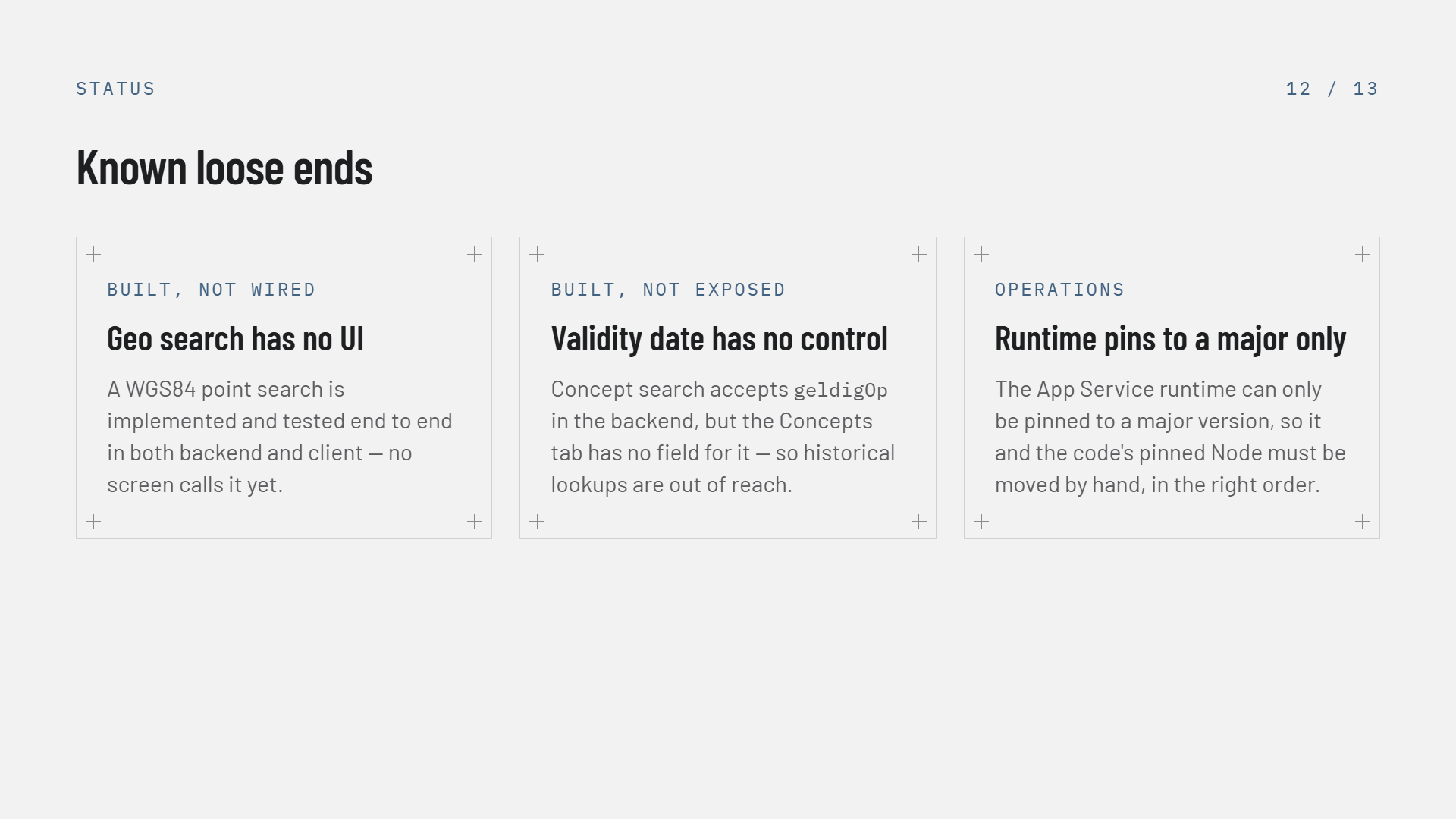
Slide 12 of 13, Known loose ends, three cards โ€” BUILT, NOT WIRED: Geo search has no UI, a WGS84 point search is implemented and tested end to end in both backend and client but no screen calls it yet. BUILT, NOT EXPOSED: Validity date has no control, concept search accepts geldigOp in the backend but the Concepts tab has no field for it, so historical lookups are out of reach. OPERATIONS: Runtime pins to a major only, the App Service runtime can only be pinned to a major version, so it and the code's pinned Node must be moved by hand, in the right order

Three known gaps: two features built but unreachable, one operational hazard

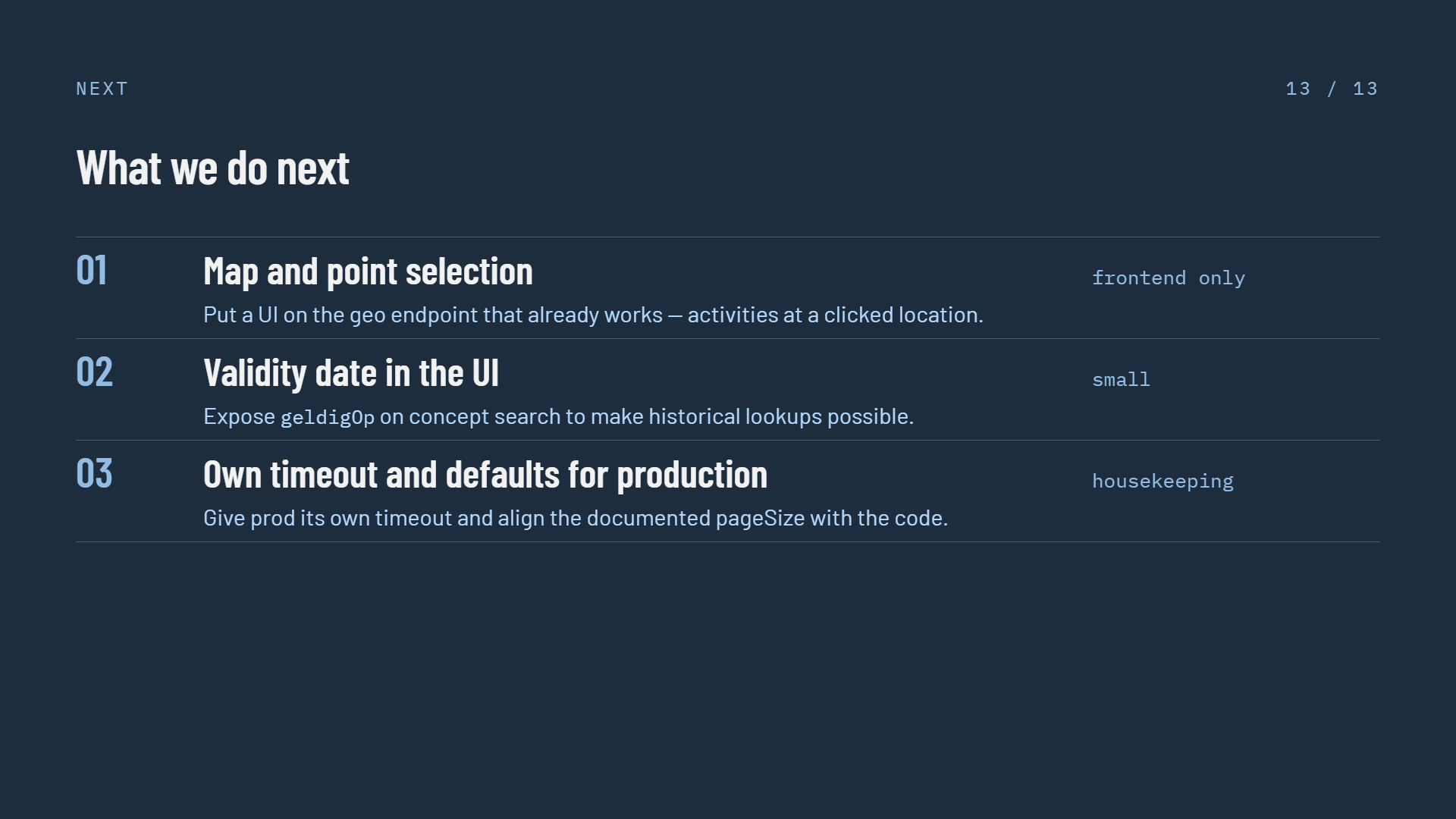
Slide 13 of 13, What we do next, a numbered list on a dark navy background โ€” 01 Map and point selection, put a UI on the geo endpoint that already works so activities can be found at a clicked location, tagged frontend only; 02 Validity date in the UI, expose geldigOp on concept search to make historical lookups possible, tagged small; 03 Own timeout and defaults for production, give prod its own timeout and align the documented pageSize with the code, tagged housekeeping

Three follow-ups โ€” two of the August five shipped in v2026.09.6