DSO Integration
Overview
The Linked Data Explorer integrates with the Digitaal Stelsel Omgevingswet (DSO) — the national catalogue and registry stack underpinning the Dutch Environment and Planning Act. This integration lets process designers link BPMN subprocesses directly to their authoritative DSO activiteit, browse the Stelselcatalogus and werkzaamheden registry from inside LDE, verify references against live DSO data, and — as of v1.9.3–v1.9.5 — extract an activity's toepasbare regels into deploy-ready LDE assets (DMN, form scaffold) or hand them off to the CPSV Editor for publishing.
A toggle in Settings selects between the pre-production and production DSO environments independently of the LDE environment.
Prefer the short version?
DSO Viewer APIs — Slide Deck covers the same ground in thirteen slides, and is downloadable as a PDF. It was re-exported on 24 September 2026 against v2026.09.6, so it carries the sixth API, the fourth tab and the dossier — but it remains a dated review, and this page is the account that is kept current.
The six DSO APIs behind the viewer
The frontend never calls DSO directly. Every request goes through the LDE backend, which
mounts its DSO proxy at /v1/dso and attaches the x-api-key credential server-side. That
keeps the DSO key out of the browser and lets a single X-Dso-Env header switch the whole
viewer between the pre-production and production stelsel.
DsoExplorer.tsx  →  dsoService.ts  →  LDE /v1/dso/*  →  dso.service.ts  →  DSO API
   (component)      (frontend client)     (proxy route)      (backend service)
Six separate upstream APIs back the viewer:
| # | API | Path | What it backs in LDE |
|---|---|---|---|
| 1 | Stelselcatalogus | catalogus/api/opvragen/v3 |
Concepts tab — concept and term lookup |
| 2 | RTR Gegevens | toepasbare-regels/api/rtrgegevens/v2 |
Activities tab, activity detail, child-activity lookups, BPMN URN verification |
| 3 | Zoekinterface | toepasbare-regels/api/zoekinterface/v2 |
Works tab — werkzaamheden search and autocomplete |
| 4 | Opvragen Werkzaamheden | toepasbare-regels/api/opvragenwerkzaamheden/v1 |
Works tab — versioned werkzaamheid detail |
| 5 | Toepasbare Regels Uitvoeren Gegevens | toepasbare-regels/api/toepasbareregelsuitvoerengegevens/v1 |
Applicable Rules panel — rule metadata and STTR download |
| 6 | Omgevingsdocumenten Presenteren (Ozon) | omgevingsdocumenten/api/presenteren/v8 |
Quality Profile tab — regelingen search, the regeltekst annotation graph, and document-component text behind the activity dossier |
Pre-production base URLs are service.pre.omgevingswet.overheid.nl/publiek/<path>; production
is the same path on service.omgevingswet.overheid.nl. Each base URL is overridable per
environment (DSO_CATALOGUE_BASE_URL, DSO_RTR_BASE_URL, DSO_ZOEKINTERFACE_BASE_URL,
DSO_OPVRAGEN_WERKZAAMHEDEN_BASE_URL, DSO_UITVOEREN_GEGEVENS_BASE_URL, DSO_OZON_BASE_URL,
each with a _PROD counterpart), and the two environments carry their own keys
(DSO_API_KEY / DSO_API_KEY_PROD) — the same pair authenticates against Ozon.
Ozon joined in v2026.09.6, because the chain an activity hangs from spans it: the legal
source, the annotations on that source, and the text of the document components they point at
all live in Omgevingsdocumenten Presenteren, not in the RTR. Its client (ozon.service.ts,
against v8.5.2) carries three quirks the rest of the surface does not — the full OGC
Content-Crs value, a slash-to-underscore transform on identificatie, and
environment-specific toepasbare-regel ids.
Common to every call: Accept: application/hal+json (STTR downloads ask for application/xml,
autocomplete for application/json), a DSO_TIMEOUT of 15 000 ms enforced with an
AbortController, and HAL payloads returned verbatim inside LDE's { success, data }
envelope — the frontend unwraps _embedded.* and _links.next itself. Any non-2xx from DSO
surfaces as a 502 from LDE carrying the upstream body, except an upstream 404, which is
passed through as a 404. Both are RFC 9457 problem-details responses, like every other LDE
error.
Which DSO environment a call reaches is decided per request: the X-Dso-Env: prod header,
which the frontend sends, or the query parameter ?env=prod selects production; anything
else targets pre-production. Each environment uses its own base URLs and API key.
Every /v1/dso route and the upstream call it makes:
| LDE endpoint | Method | DSO API | Upstream call |
|---|---|---|---|
/v1/dso/begrippen |
GET | 1 Catalogus | GET /begrippen |
/v1/dso/activiteiten |
GET | 2 RTR | GET /activiteiten |
/v1/dso/activiteiten/{urn} |
GET | 2 RTR | GET /activiteiten/{urn} |
/v1/dso/activiteiten/oin |
POST | 2 RTR | POST /activiteiten/_zoek (bestuursorgaan), every page up to 10 |
/v1/dso/activiteiten/zoek |
POST | 2 RTR | POST /activiteiten/_zoek (date + geometry) |
/v1/dso/werkzaamheden/zoek |
POST | 3 Zoekinterface | POST /werkzaamheden/_zoek |
/v1/dso/werkzaamheden/suggereer |
POST | 3 Zoekinterface | POST /werkzaamheden/_suggereer |
/v1/dso/werkzaamheden/{urn} |
GET | 4 Opvragen Werkzaamheden | GET /werkzaamheden/{urn} |
/v1/dso/toepasbare-regels |
GET | 5 Uitvoeren Gegevens | GET /toepasbareRegels |
/v1/dso/toepasbare-regels/{id}/sttr |
GET | 5 Uitvoeren Gegevens | GET /toepasbareRegels/{id}/sttrBestand |
/v1/dso/toepasbare-regels/{id}/dmn |
GET | 5 Uitvoeren Gegevens | GET /toepasbareRegels/{id}/sttrBestand + DMN extraction |
/v1/dso/toepasbare-regels/{id}/form-scaffold |
GET | 5 Uitvoeren Gegevens | GET /toepasbareRegels/{id}/sttrBestand + form-js scaffold |
/v1/dso/regelingen/zoek |
POST | 6 Ozon | POST /regelingen/_zoek, paged by page.totalPages up to 10 |
/v1/dso/regelingen/{id}/annotaties |
GET | 6 Ozon | the regeling's annotation graph |
/v1/dso/regelingen/{id}/documentstructuur/{wId} |
GET | 6 Ozon | the document component's own text |
/v1/dso/activiteiten/{urn}/dossier |
GET | 2 + 5 + 6 | the composite route — see Activity dossier and quality profile |
One parameter, two formats. datum is the one value that crosses the RTR/Ozon boundary,
and the two expect different formats: the RTR takes dd-MM-yyyy, Ozon takes YYYY-MM-DD.
No single value satisfies both, so the route keeps dd-MM-yyyy on its own surface and
converts before calling Ozon. Until v2026.09.6 it forwarded the parameter unchanged, and the
failure was silent: the annotations leg was caught into provenance.failures while
legalSource.available stayed true, so a real regeling title rendered above "0 juridische
regels".
Request parameters and response shapes for each route are in the API Specification.
DSO environment toggle
The DSO environment is set in Settings → DSO environment and persisted to localStorage. It is independent of the LDE environment toggle — pre-production LDE can talk to production DSO and vice versa, which matters because some authority data is only available in one environment.
| LDE setting | API target |
|---|---|
| Pre-production | service.pre.omgevingswet.overheid.nl |
| Production | service.omgevingswet.overheid.nl |
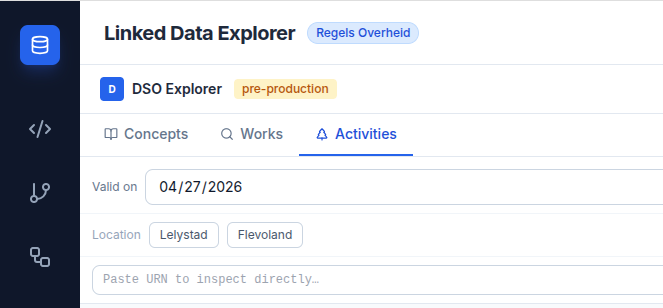
A coloured badge in the DSO Explorer header reflects the active environment — amber for pre-production, green for production.
Concepts tab
Full-text search over the Stelselcatalogus, paged 20 at a time. Returns concepts with their URI, label, definition, and source. Useful for discovering the canonical conceptual reference behind a citizen-facing term.
The backend also accepts a validity date (geldigOp, YYYY-MM-DD) on this search, but the
Concepts tab has no field for it — historical concept lookups are out of reach from the UI.
Works tab — werkzaamheden
Search the Zoekinterface for werkzaamheden (the citizen-facing tasks that anchor a permit application — "boom kappen", "Bed & Breakfast starten"). Autocomplete fires after two characters with 300ms debounce.
Each result shows:
- The human-readable omschrijving (e.g. "Bed & Breakfast starten")
- The full
functioneleStructuurRefURI — the pivot to STTR files used by the Phase 4 extraction (see Applicable rules → LDE assets) - The short werkzaamheid URN
Selecting a result opens a detail panel with the current version's metadata, validity period, and full version history (each version showing start/end dates and a "current" badge).
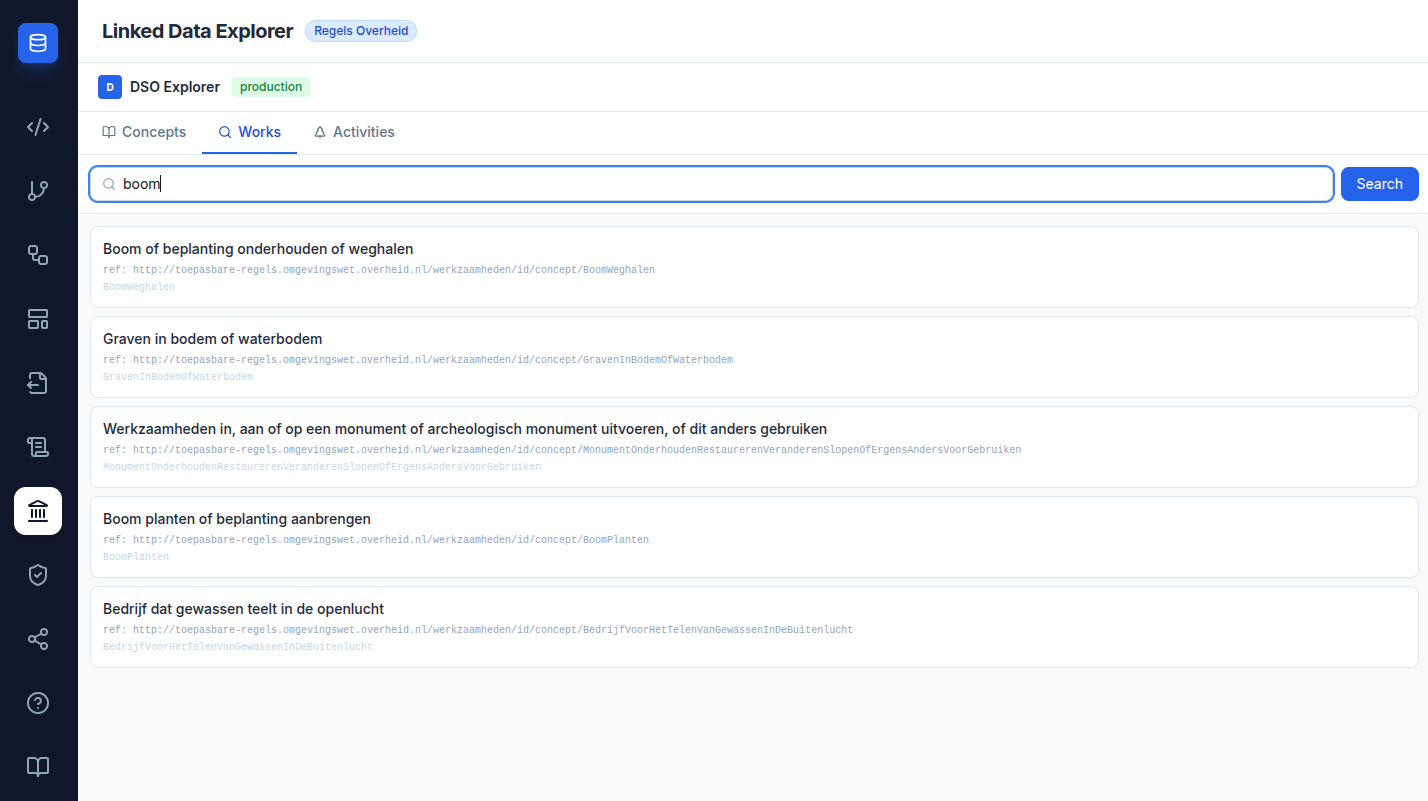
Default sort order is meestGekozen — the most-used Omgevingsloket werkzaamheden appear first.
The tab straddles two APIs. Search and autocomplete hit the Zoekinterface
(POST /werkzaamheden/_zoek, POST /werkzaamheden/_suggereer), but the detail panel that
opens on a result comes from Opvragen Werkzaamheden (GET /werkzaamheden/{urn}) — that is
the call that returns the full _embedded.werkzaamheidversies list with trefwoorden and
logischeRelaties. Autocomplete failures degrade silently to an empty suggestion list rather
than surfacing an error.
Activities tab — activiteiten
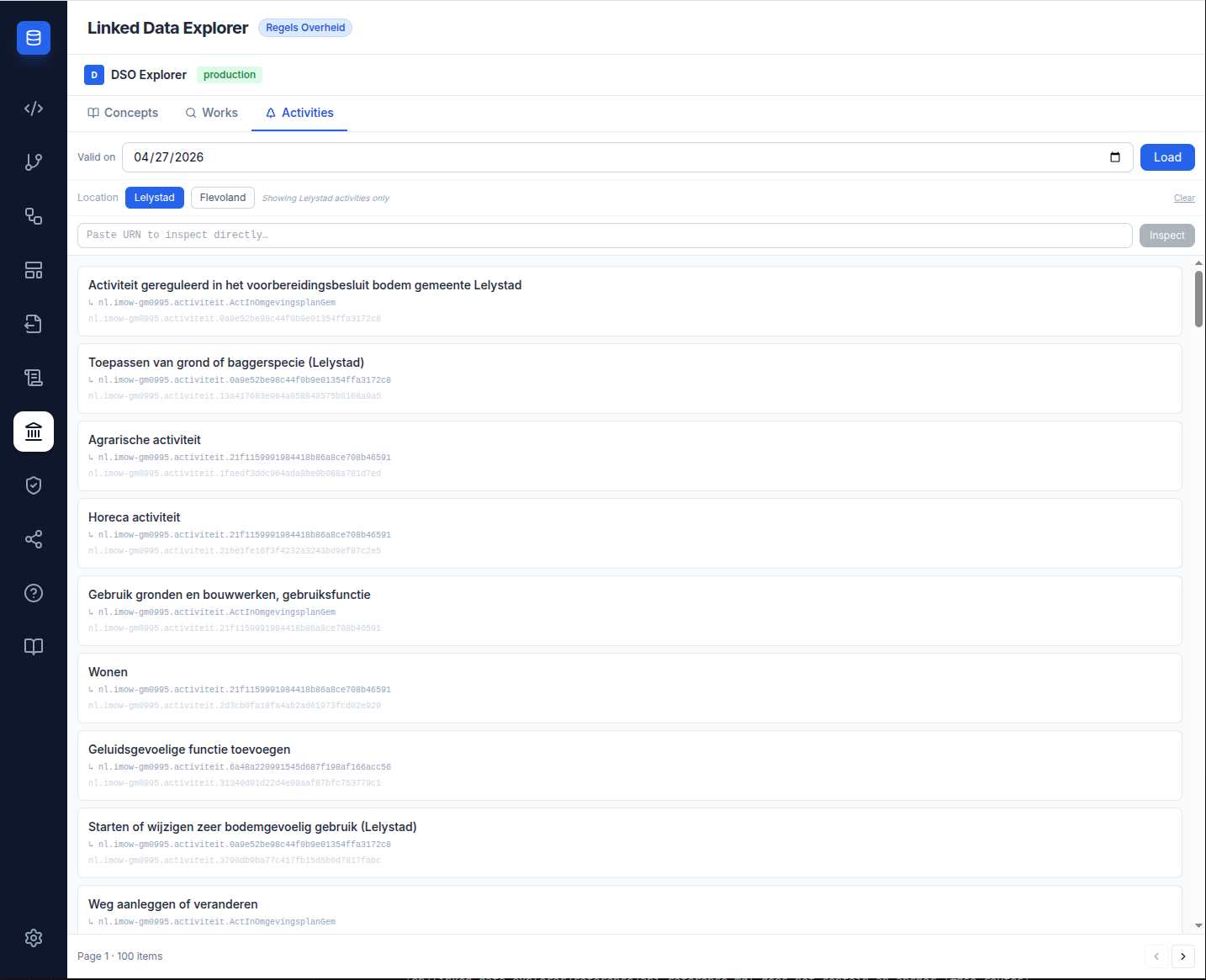
Browse the RTR (Registratie Toepasbare Regels) for activiteiten. The tab has two load modes:
| Mode | Call | Paging |
|---|---|---|
| By date (default) | GET /activiteiten?datum — every activity valid on that date |
20 per page |
| By authority (Level + Authority) | POST /activiteiten/_zoek with bestuursorgaan.oin — every page fetched by the backend and combined into one list |
Pages of 200, up to 10 (2,000 activities); the name filter runs client-side over the whole set |
Any authority, chosen by level (v2026.09.5). Two dropdowns pick the authority whose
activities to load: Level — gemeente, provincie, waterschap or rijk — and Authority
within it. Options show the name without its level prefix, so typing jumps straight to it,
and sort the way a reader expects — 's-Hertogenbosch under H. The list covers 342
municipalities, 12 provinces, 21 water boards and 12 ministries, each with its OIN
(Organisatie-identificatienummer), generated from the government organisations register
(organisaties.overheid.nl) by npm run authorities:generate; ended organisations and those
without an OIN are left out. Until v2026.09.5 the tab offered four hardcoded authorities —
Lelystad, Flevoland, Ede and Gelderland — so no other authority's activities could be browsed.
The same list supplies the OIN-to-name mapping, because the RTR only ever returns the
authority code (GM0995), never a readable name — so importing a form from any authority
now gives it the register's name instead of a code.
Every page is fetched (v2026.09.5). The by-authority load used to request a single page of
200 and present it as the authority's whole set: Provincie Zuid-Holland has 838 activities on
DSO pre-production, so its list was silently partial. The backend now fetches every page, up
to 10, and returns one combined list; when an authority exceeds that cap, page.size stays
below page.totalElements. Measured against DSO production on 19 September 2026, Zuid-Holland
loaded 516 of 516.
The date input above the list defaults to today; changing the date and clicking Load re-fetches the authority list valid on that date. Dates are entered as ISO (YYYY-MM-DD) and converted to the DSO's dd-MM-yyyy before being sent.
A third mode exists in the backend but has no UI: POST /v1/dso/activiteiten/zoek also accepts
a WGS84 point (geometrie + crs=epsg:4326) and is implemented and tested end to end. It is
waiting on a map or point-selection feature — see POST /dso/activiteiten/zoek in the
API Specification.
Name search (v1.9.4). Choosing an authority loads its full activity set and reveals a search box that live-filters by name — so activities such as "Boom kappen of houtopstand vellen" are findable without walking the hierarchy.
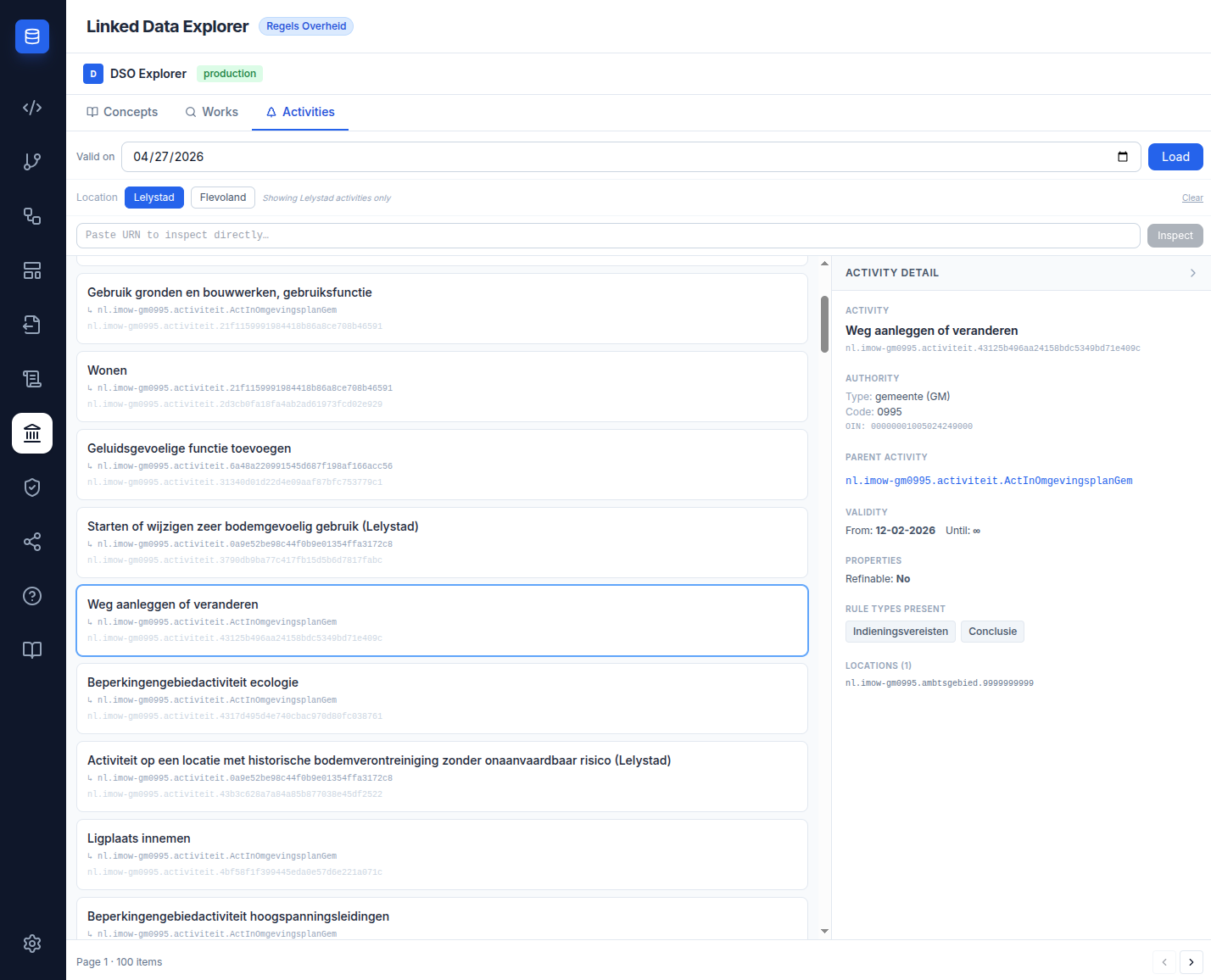
Each activity card shows badges for the rule types declared on the activity:
- Conclusie — full DMN decision content available
- Indieningsvereisten — application requirements (questionnaire-style DMN)
- Maatregelen — measures (textual content, structured per maatregel)
These badges flag which downstream LDE assets can eventually be derived from the activity in Phase 4 (DMN, form, document template).
Activity Detail panel
Clicking an activity row opens the detail panel. It shows:
- omschrijving and full URN
- bestuursorgaan (authority) — bestuurslaag, organisatieType, code, OIN
- validity (begindatum / einddatum)
- parent activity link (if any)
- child activities — see the fan-out below
- rule types present, with download links
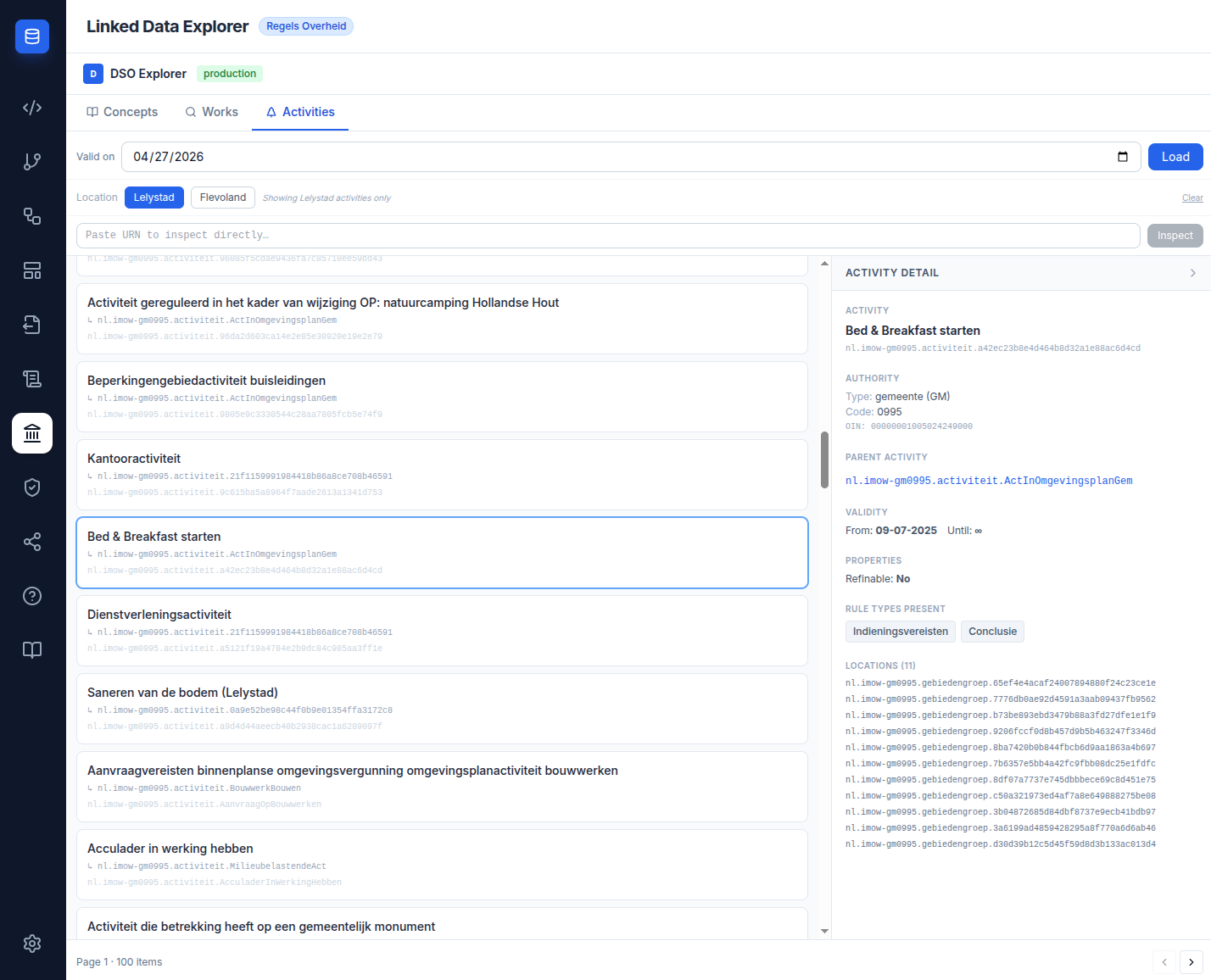
If an activity is queried from the wrong DSO environment (e.g. trying to view a production-only URN while the toggle is on pre-production), the detail panel shows a clear "not available in this environment" message rather than a raw 404.
Child-activity fan-out — one click, 1 + N requests
The RTR returns child activities as bare HAL hrefs under _links.onderliggendeActiviteiten,
with no omschrijving attached. The panel therefore cannot label them without asking the API
about each child individually. As soon as the parent resolves, it fires one additional
activity-detail request per child, purely to read each child's name — but through a pool
of five, so the requests leave in waves rather than all at once:
GET /v1/dso/activiteiten/{parent-urn}       ->  1 request
  |- GET /v1/dso/activiteiten/{child-1}     -+
  |- GET /v1/dso/activiteiten/{child-2}      |-  N requests, at most 5 in flight,
  |- ...                                    -+   five workers off a shared cursor
Every one of those is the same endpoint chain as the parent, so a single click costs 1 + N
upstream RTR calls. N is whatever the parent declares — an activity such as
Bedrijfsactiviteiten, with 23 children, means 24 requests to render one detail panel.
What that means in practice:
- The fan-out keeps
Promise.allSettledsemantics, so one failing child never breaks the panel or the other lookups — a child that fails simply never reports a name. - Children that resolve render as a named link; children that fail, or that come back without
an
omschrijving, fall back to the raw URN — still clickable, just unlabelled. This is why a panel can show a mix of names and URNs. - The
Child activities (N)heading counts the href list, not the resolved names, so the count stays correct even when some lookups fail. - Each child request inherits the parent's
datumandenv. - Names appear as each child resolves, rather than when the slowest one does.
- Names live in local component state, cleared and re-fetched on every
urn/datum/envchange, so the frontend itself never caches across navigations. The backend does. Activity detail — the call every child request makes — is TTL-cached for five minutes under the named cachedso-activiteit, so re-opening an activity you already visited inside that window costs the RTR nothing. Staleness there is accepted deliberately;DELETE /v1/cache/clearis the escape hatch, andGET /v1/cache/statsreports across every registered cache. - The panel stops writing after teardown. Until v2026.09.6 the component had no cancellation
guard at all — no flag, no
AbortController— so an in-flight fan-out could write names for an activity the user had already left. That stayed latent while everything raced to finish at once; a pool that drains over time would have made it real.
This was the viewer's heaviest interaction until the dossier arrived, and it exists only to turn hrefs into readable names.
Activity dossier and quality profile
One call assembles an activity's whole chain (v2026.09.6).
GET /v1/dso/activiteiten/{urn}/dossier joins three upstream legs — the IMOW activity and its
child URNs from the RTR, the legal source and its annotation graph from Ozon, and both rule
sets from Uitvoeren Gegevens — into a single Dossier, and returns it with its
QualityProfile. The join lives in exactly one service by design: a fan-out across three
APIs should have one place that knows how the pieces fit together.
A legal source per bestuurslaag
The lookup that finds an activity's legal source used to hardcode regelingtype_003, the
gemeente instrument — so for any provincie, waterschap or rijk activity it searched for a
document type that authority never publishes. Each level has its own:
| Bestuurslaag | Core instrument |
|---|---|
| gemeente | Omgevingsplan |
| provincie | Omgevingsverordening |
| waterschap | Waterschapsverordening |
| rijk | AMvB |
The level comes from bestuursorgaan.bestuurslaag, falling back to the authority code prefix
when the RTR does not supply it, and an explicit authority parameter still overrides both.
Where several regelingen of the right type exist — the Rijk publishes two AMvBs — they are
tried in order, capped at three, because each annotation graph can run to megabytes.
A national activity needs no municipality
Until v2026.09.6 the dossier refused any mnre URN that arrived without an authority
parameter. That guard was LDE's own, not a DSO requirement, and it rejected activities
that needed nothing: RijksmonArchMonument carries its own Conclusie and
Indieningsvereisten and scores 23/23 semantic, yet answered 400 — advising the caller to
supply a municipality, which no national activity has.
What the profile measures
Two axes, deliberately never combined into one number:
| Axis | Question it answers |
|---|---|
| Legibility | How readable are the rules as they stand? |
| Recoverability | Where they are not, how far can a reader recover the reasoning from the published material? |
A single headline grade is not produced. The profile exists to compare activities and municipalities, and a grade flattens exactly the differences being compared.
Every decision and input name is classified:
| Class | Meaning |
|---|---|
semantic |
The name says what it is |
opaque-resolvable |
A GUID, but the dossier could resolve what it refers to |
opaque-dangling |
A GUID that resolves to nothing |
A GUID is recognised with either separator and with none at all, because IMOW URN local
names are 32 contiguous hex characters — a separator-only detector reported GUID-named
activities as semantic, which is the exact case the profile exists to surface.
Identity resolvability is derived from what the lookup returned, not assumed by
construction, so an identity that cannot be resolved scores as such rather than being
credited.
Two rules keep the numbers honest. Conclusie and Indieningsvereisten are always reported separately and never blended. And a rule set that is absent says so rather than reporting zeros, because zeros read as measured-and-empty.
The evidence travels with the counts: each item's naming class, each input's own question
text (its vraagTekst, resolved through its uitvoeringsregelRef), and the legal-source
articles. A figure such as "3/7 semantic, 4 opaque" can therefore be audited by the
municipality whose data it describes.
A partial dossier says which half is missing
provenance distinguishes a candidate regeling checked and found not to annotate the
activity from one that could not be fetched at all. Before v2026.09.6 an unreadable
document was folded into the same summary sentence, asserting a negative about a document
nobody had read. Each failure now names its subject — documentComponent the wId, dmn
the rule identifier, toepasbareRegels the functioneleStructuurRef — so a reader can tell
"we looked and it is not there" from "we could not look". That is what makes a partial
dossier honest rather than broken.
The Quality Profile tab
The fourth tab, beside Concepts, Works and Activities. It renders the profile of the activity selected in the Activities tab.
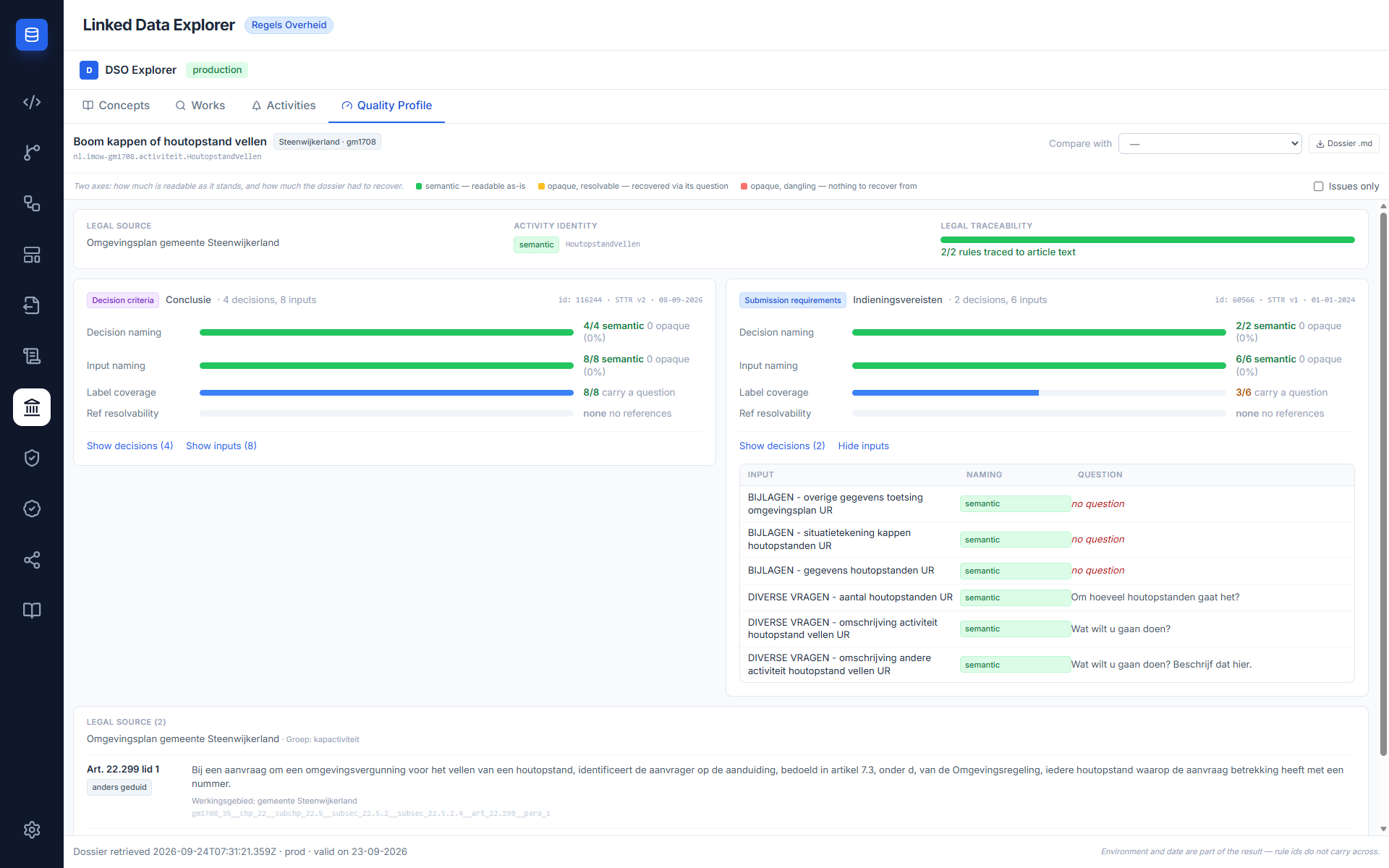
The selection is shared, not tab-local. selectedUrn, the active validity date, the
authority OIN and the level all live in the DSO Explorer shell rather than in the Activities
tab, so switching tabs no longer clears them. Changing Level or Authority, clicking
Load, and closing the detail panel still do. Returning to Activities restores the
authority's filtered list rather than resetting to the unfiltered date-based one.
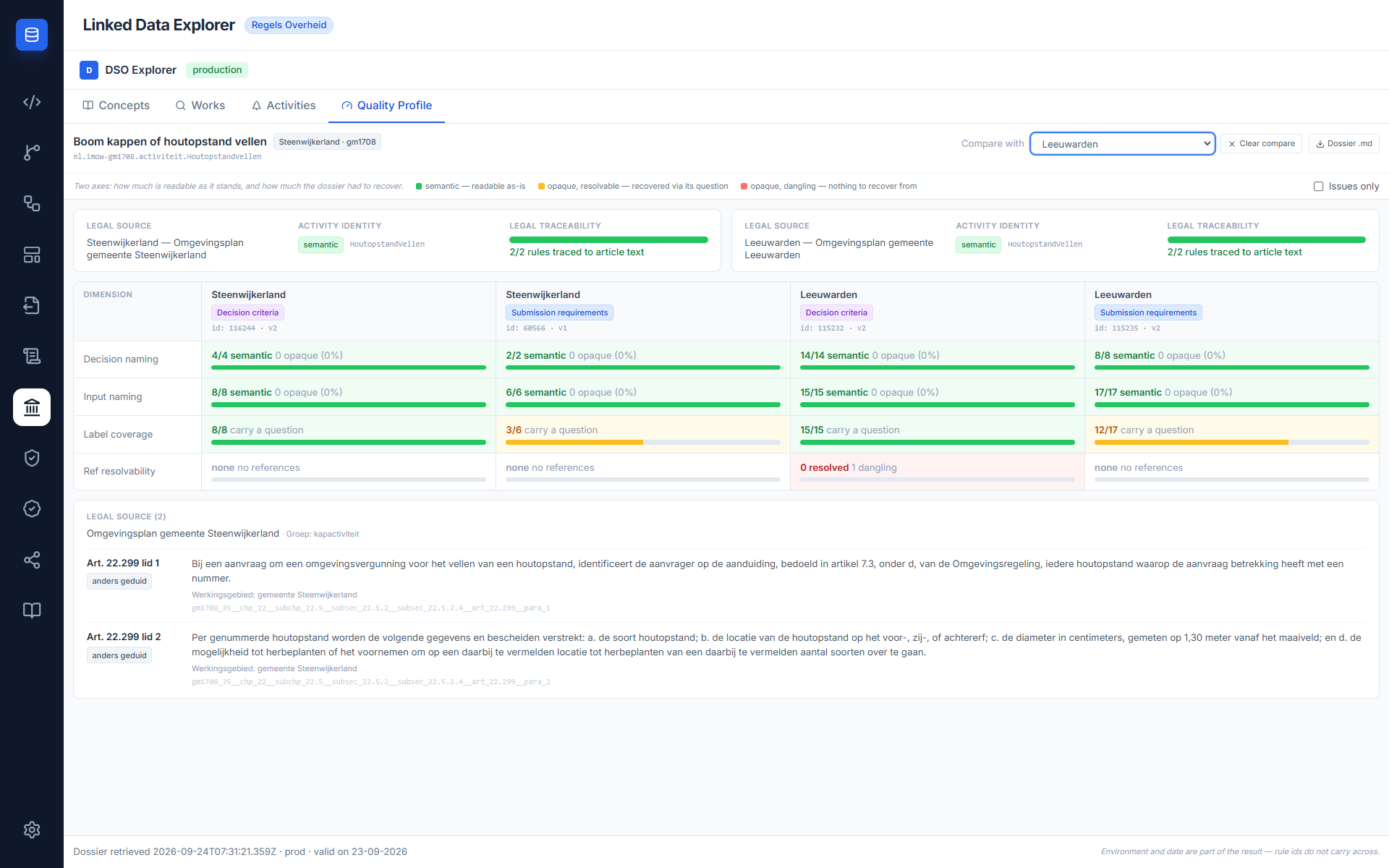
Compare keeps the two authorities apart. Scorecard is the default; Compare uses a matrix
with one column per authority, and a Clear compare control sits beside Dossier .md
while a comparison is active. The comparison fetches with the compared authority's code:
passing the primary activity's bevoegd gezag instead meant comparing Lelystad with
Steenwijkerland searched Lelystad's regelingen for a Steenwijkerland activity, so the compared
card read "Steenwijkerland — Omgevingsplan gemeente Lelystad" with 0/10 rules traced for an
activity that has two.
The authority filter sends the code, not the OIN
The backend matches the value against bevoegdGezag, so an OIN would silently fail the
national-activity path that needs it.
A taxonomy node points at its children. An activity that groups others carries no rules of
its own, so its dossier is correctly empty — which told the reader nothing about where the
rules actually are. The Dossier now carries childActivityUrns, taken from the RTR response
the first leg already fetches, so it costs no extra upstream call. Where both rule sets are
absent and children exist, the tab says so and lists them as links that load the child's own
profile: Rijksmonumentenactiviteit points at RijksmonArchMonument and RijkmonMonument,
which carry a Conclusie and Indieningsvereisten each. An activity with children and rules
of its own is not a taxonomy node and does not get the notice.
The teaser in the detail panel
The activity detail panel carries a compact quality-profile section — the one place the two rule sets are summed, into a single decision-naming row and a single input-naming row. It is a pointer at the tab, not a score, and the tab itself still keeps the two apart.
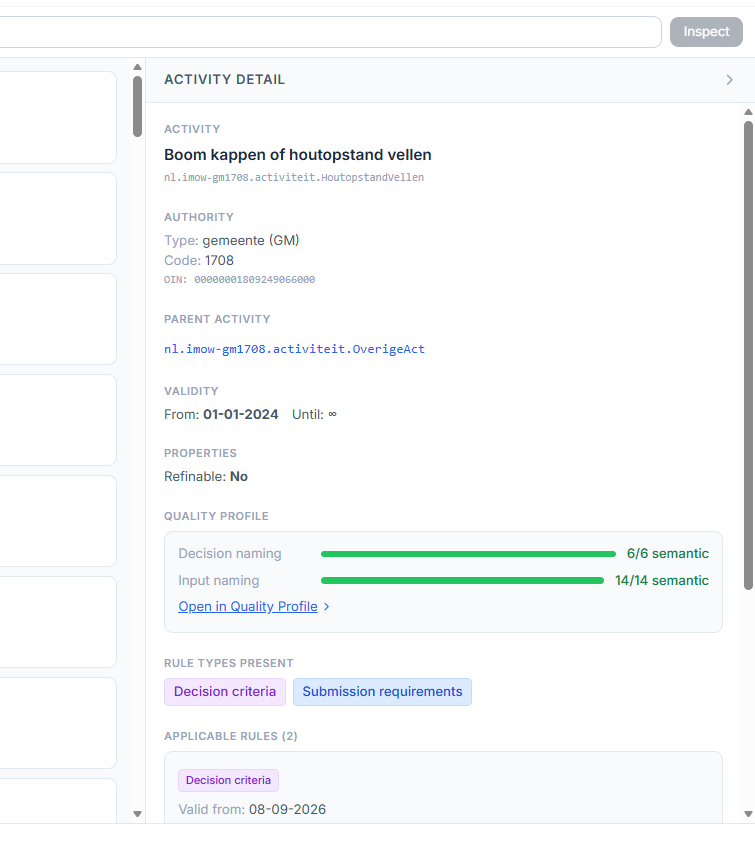
It renders from cache only, and that is load-bearing. The dossier call fans out across
three upstream APIs including Ozon, so selecting an activity must never trigger it; a test
asserts exactly that, because the failure mode is a detail panel that feels broken. The
frontend caches the dossier by env|datum|urn and stores the promise rather than the
resolved value, so concurrent calls for one key dedupe, and evicts on failure so a retry is
not permanently blocked by one bad response.
Dossier .md
Dossier .md renders the assembled dossier — legal source, annotations, decision criteria,
submission requirements and the quality profile — as a readable Markdown document, so a result
can be circulated and reviewed outside the app. The same renderer runs from the command line
as npm run dso:dossier; renderDossier lives in scripts/dossier-render.mjs and is imported
by both, with a test asserting the two references are the same function object rather than
merely producing equal output, so the two cannot drift apart.
Applicable rules → LDE assets (Phase 4)
As of v1.9.3 the Activity Detail panel includes an Applicable Rules section listing the toepasbare regels fetched live from the DSO Uitvoeren Gegevens API, grouped by rule type (Conclusie / Indieningsvereisten) with the validity date and STTR version. Each rule type exposes a set of one-click actions, backed by the GET /v1/dso/toepasbare-regels/* backend routes:
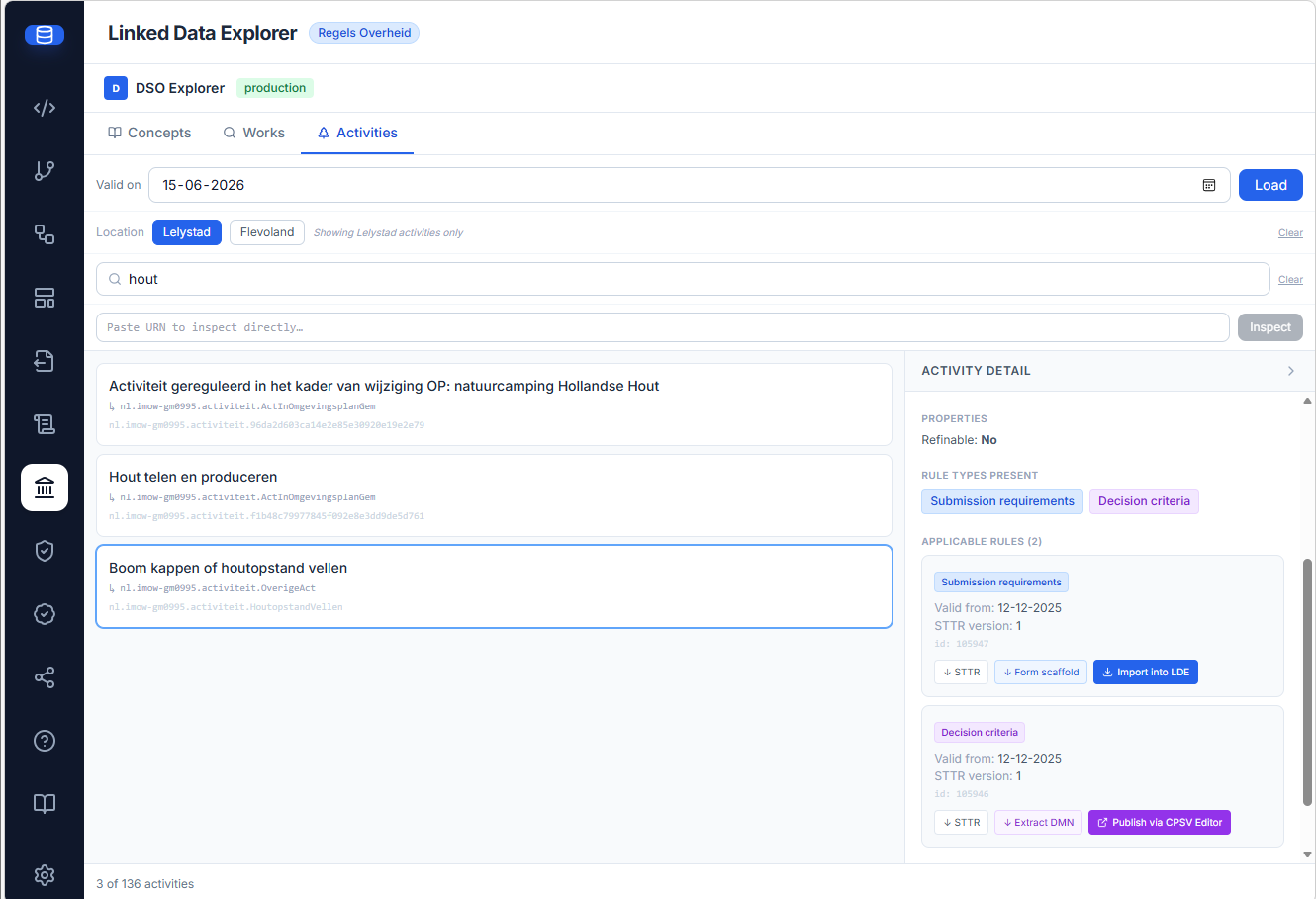
| Action | Rule type | What it does | Backend route |
|---|---|---|---|
| ↓ STTR | any | Downloads the raw STTR XML | /toepasbare-regels/:id/sttr |
| ↓ Extract DMN | Conclusie | Extracts the embedded DMN decision table as a standalone, deploy-ready .dmn file |
/toepasbare-regels/:id/dmn |
| ↓ Form scaffold | Indieningsvereisten | Generates a form-js JSON scaffold from the STTR questionnaire | /toepasbare-regels/:id/form-scaffold |
| ↓ Import into LDE (v1.9.4) | Indieningsvereisten | Saves the generated form-js scaffold straight into the Form Editor as a draft — no manual download/import | /toepasbare-regels/:id/form-scaffold |
| Publish via CPSV Editor (v1.9.4) | Conclusie | Opens the CPSV Editor with a deep-link to publish the extracted DMN to TriplyDB, where the LDE DMN picker can consume it | (deep-link) |
Form scaffold mapping. The STTR questionnaire is mapped to form-js controls:
| STTR question | form-js field |
|---|---|
boolean |
checkbox |
list |
select, options from uitv:optie |
number |
number |
inter:inputType=textarea |
textarea |
| anything else | textfield |
uitv:bijlage (attachment) |
labelled placeholder textfield |
uitv:geoVerwijzing |
skipped — not representable in form-js |
A questionnaire containing a geo reference therefore produces a scaffold with that question missing; check the source STTR if a generated form looks short.
Scaffolds are stamped executionPlatform: Camunda Platform 7.21.0 and status: 'dso', and can
be downloaded as JSON or imported straight into the Form Editor. Imported forms are tagged with
the readable authority name (e.g. "Lelystad", v1.9.4), falling back to the RTR code (GM0995) for
authorities outside the known presets, and show a green DSO badge in the Form Editor list
(v1.9.5).
Deploy-ready DMN. normalizeDmnForOperaton applies five fixes that make Sogelink STTR Builder output both deployable and evaluatable (v1.9.4–v1.9.5): DMN 1.2 namespaces are upgraded to 1.3; missing ids are injected on <input> and <inputExpression>; <variable> names are made FEEL-safe with the <inputExpression> references rewritten to match (hyphens and spaces previously broke evaluation); untyped outputs get an explicit typeRef (BIZ-004); and camunda:historyTimeToLive="180" is set per decision so the model deploys exactly as handed off. Verified end-to-end against Operaton (the normalized HoutopstandVellen decision deploys with all 7 decisions and its root decision evaluates without the previous FEEL error).
The DMN publish handoff is the LDE side of the same deep-link contract the CPSV Editor consumes via its DSO → DMN import. LDE has no local DMN store, so the link — <VITE_CPSV_EDITOR_URL>/?dsoImport=dmn&dmnId=<id>&env=<pre|prod> plus activity metadata — carries identifiers only; the CPSV Editor then fetches the XML from GET /v1/dso/toepasbare-regels/{dmnId}/dmn on this same backend. That endpoint is therefore a cross-application contract, not an internal route.
Linking a BPMN subprocess to a DSO activiteit
The BPMN Modeler footer panel has a DSO Activity selector. Pasting a URN and clicking Verify queries the live DSO RTR — on success, the panel shows the omschrijving, authority, and a direct link to the public RTR viewer. The URN is then persisted on the BPMN process element as ronl:dsoActiviteitUrn.
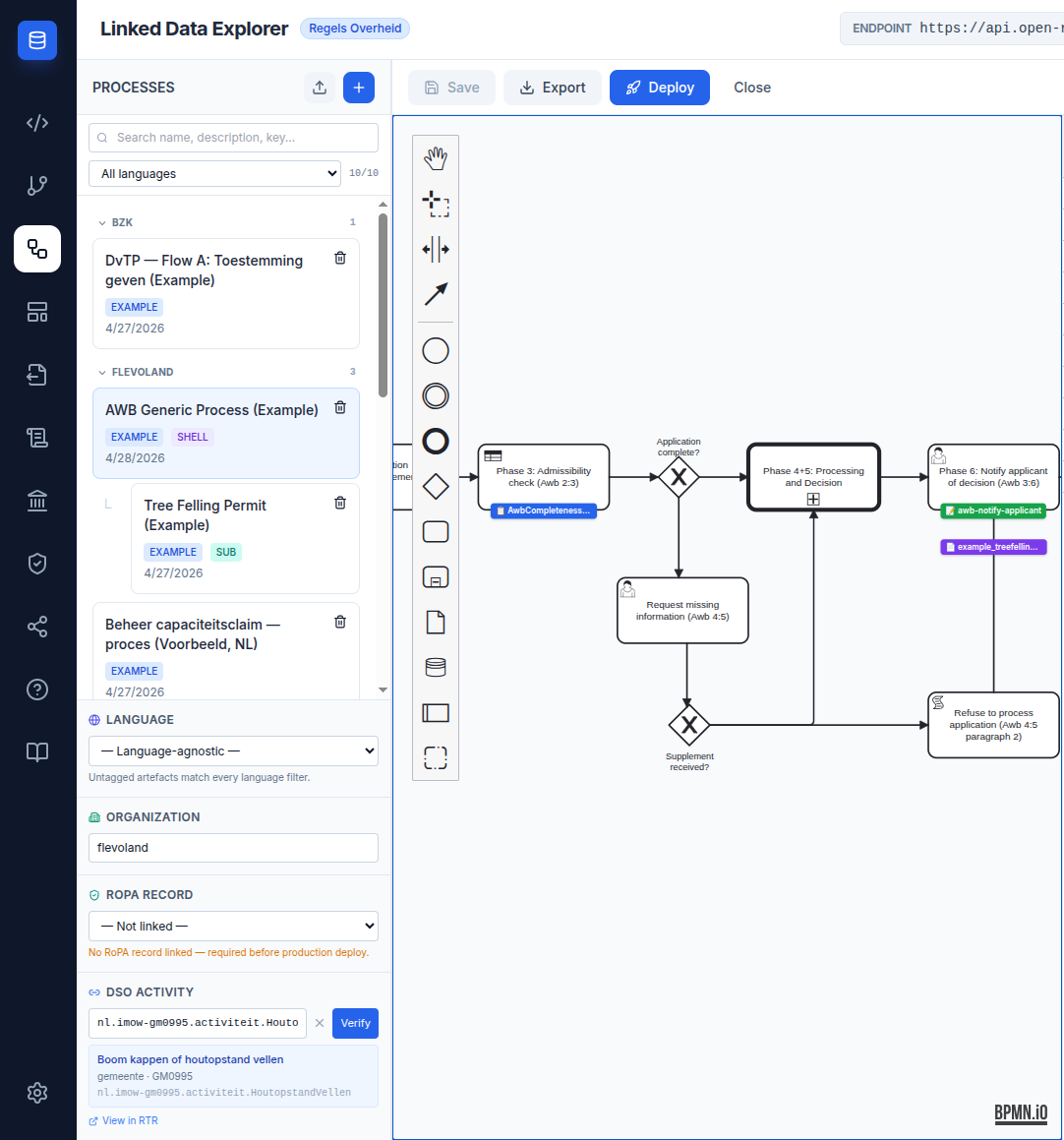
The verified URN survives saveXML round-trips and follows the same pattern as other ronl: extensions (RoPA, language, organization).
Verification always queries pre-production
The selector calls getActiviteitDetail(urn) without an env argument, so it falls back
to the pre default and ignores the DSO environment toggle in Settings. A URN that
exists only in production will report "URN not found in DSO" here no matter which
environment is selected — verify it in the DSO Explorer's Activities tab instead.
Phase plan
The integration is delivered in phases. The detailed plan, current status, confirmed test anchors, and remaining work for each phase are tracked in DSO Integration Phase Plan. Phases 1–3 are live as of v1.5.3; Phase 2a/2d and Phase 4 (STTR → DMN/form extraction, Import into LDE, and the DMN publish handoff) landed across v1.9.3–v1.9.5. v2026.09.6 added the activity dossier, its quality profile and the sixth upstream API they need.
Related documentation
- DSO Viewer APIs — Slide Deck — the twelve-slide summary, plus the PDF
- DSO Explorer user guide — step-by-step search and link workflow
- DSO Integration Phase Plan — phase status, test anchors, implementation order
- BPMN Modeler — DSO activiteit linkage